
1 단계
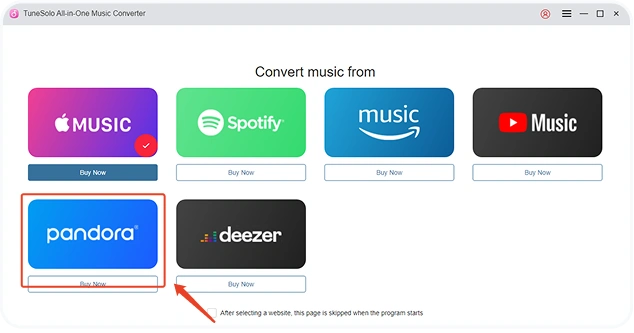
Open the program and click "Open the Pandora web player" to access the built-in player.
Download at 35X faster speeds and convert any Pandora song, album, playlist and podcast to MP3 with 100% original quality.
Mac 승리

모든 유형의 음악 다운로드

35배 더 빠른 다운로드 속도

Spotify를 MP3로 변환

최고의 음악 품질 보장

ID3 태그 보존 및 음악 정렬 사전 설정
TuneSolo Pandora Music Converter의 모든 기능을 자세히 살펴보고 음악 감상 경험을 극대화하고 Pandora 사용 방식을 최적화하는 방법을 알아보세요.
재생 목록 전체와 앨범을 한 번에 간편하게 다운로드하세요.
TuneSolo Pandora Music Converter includes a robust batch download feature, allowing you to save entire playlists and albums with a single click. Instead of downloading each song individually, select your playlist or album, and TuneSolo will handle the entire download and conversion process in one go. This feature is invaluable for users who want a quick way to build a large offline music library without hassle. It’s designed to save you time and effort, allowing you to listen to your favorite Pandora Music uninterrupted on any device, even when you’re offline.

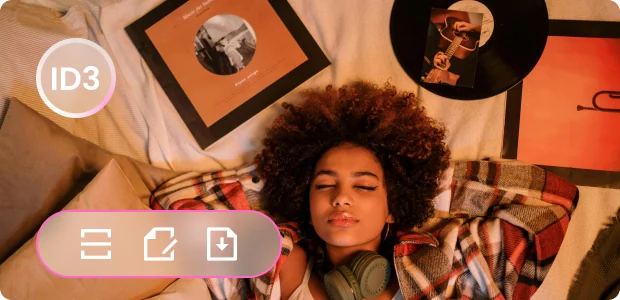
메타데이터와 ID3 태그를 모두 유지하세요.
With TuneSolo, each track is saved with its original ID3 tags and metadata, including album, artist, genre, and more. This feature keeps your offline library as organized and searchable as your online playlists, so you can easily locate specific songs or albums without sifting through unlabeled tracks. You don’t need to worry about manually tagging songs either; TuneSolo ensures that every download retains its original data, providing a well-organized listening experience.
초고속 35배 변환 속도
Enjoy lightning-fast conversion with TuneSolo Pandora Music Converter, reaching up to 35 times the standard speed without any compromise on quality. The efficient design of TuneSolo allows you to quickly download entire playlists, albums, or single tracks, building your offline library in record time. This high-speed conversion is perfect for users who want to maximize their time and have their music ready for listening without long waits. With TuneSolo, you can have your favorite Pandora Music available offline in minutes.

모든 장치 에 맞는 다양한 출력 형식
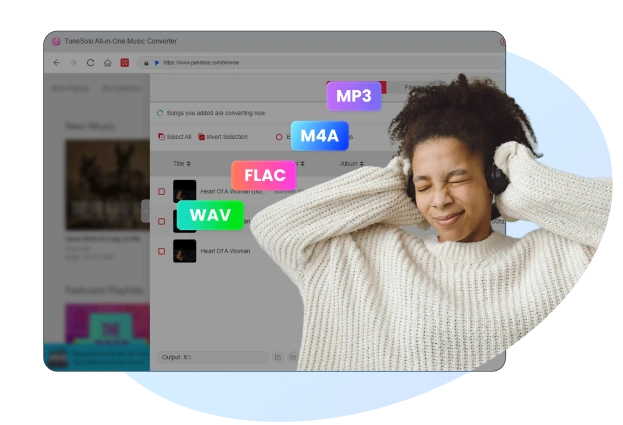
TuneSolo Pandora Music Converter supports various output formats, including MP3, M4A, FLAC, and WAV, to ensure compatibility with virtually any device. This broad selection lets you convert your Pandora Music into the format that best suits your preferred devices, ensuring you’ll never have to worry about compatibility issues. The flexibility of format choices allows you to enjoy your music on smartphones, computers, portable players, and more, giving you freedom in how and where you listen.

내장 Pandora Music Web Player for Seamless Downloading
TuneSolo’s built-in Pandora Music web player provides a one-stop solution for directly searching, converting, and downloading your music without needing to switch between apps or web pages. This integrated feature streamlines the whole process, making it as straightforward as possible to locate your favorite tracks and initiate downloads right from within TuneSolo. The convenience of this all-in-one interface enhances the user experience, making it easy to manage, organize, and save your Pandora Music effortlessly for offline listening.

Outstanding Features of TuneSolo Pandora Music Converter

Build-in Pandora Music Web Player
Allows direct access to your Pandora Music library, facilitating selection and conversion without the need for the Pandora Music app.

광범위한 호환성
Windows 및 macOS와 완벽하게 호환되어 두 시스템에서 모두 원활한 성능을 제공합니다.

다국어 지원
TuneSolo는 영어, 일본어, 독일어, 프랑스어, 중국어, 이탈리아어, 폴란드어 등을 지원합니다.

일괄 변환
Supports converting multiple Pandora Music songs at once, saving you time and effort.

유연한 오디오 사용자 정의 옵션
TuneSolo allows you to adjust audio settings such as bitrate, sample rate, and channels, giving you control over the output quality for each track.

높은 성공률의 전환
Extremely Successful Conversion Achieve 98% and a greater conversion rate for songs from Pandora Music
How to Use TuneSolo Pandora Music Converter?
1 단계
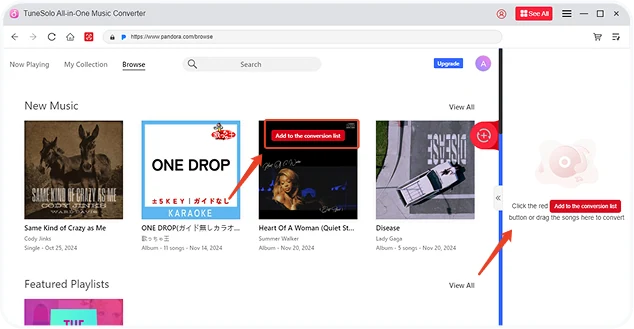
Open the program and click "Open the Pandora web player" to access the built-in player.
2 단계
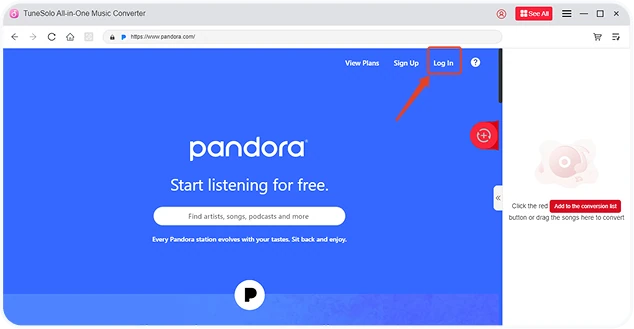
Click "Sign in" in the upper-right corner and log into your Pandora account to access your music library.
3 단계
노래를 녹색 더하기 버튼으로 끌어서 놓으면 변환 대기열에 추가됩니다.
전 세계 사용자의 리뷰

"TuneSolo Pandora Music Converter has transformed my music collection! I can finally keep my favorite playlists offline and listen to them anywhere. The speed and sound quality are fantastic, and it’s so easy to use. Highly recommend this tool for any music enthusiast!"

디지털 크리에이터
레이첼 김
"This converter has everything I was looking for. I love the batch download feature; it lets me save full albums with one click. The best part is that all the metadata stays intact, which keeps my library neat and organized. A great investment for anyone who loves Pandora Music!"

소프트웨어 리뷰어
다니엘 크루즈
"I was looking for a reliable way to download and store my favorite tracks, and TuneSolo Pandora Music Converter delivers! The built-in player is so convenient, and I can quickly download songs in any format I want. It’s fast, user-friendly, and has truly improved my listening experience!"

기술 애호가
마야 로페즈
Most Useful Pandora Converter Worth Trying
Pandora를 오랫동안 사용해 오셨나요? TuneSolo Pandora Music Converter로 업그레이드하여 더욱 향상된 음악 감상 경험을 누려보세요. 지금 설치하고 언제 어디서든 간편하게 음악을 즐기세요!
시스템 요구 사항 :
7비트의 Windows 64 이상
Mac OS X 10.11 이상
가격:
월 $13.95부터
더 많은 가치 있는 플랜 보기 >>>
지원되는 입력 오디오:
Pandora Music songs, playlists,
앨범 등
지원되는 출력 형식 :
MP3, M4A, FLAC, WAV.
자주 묻는 질문
TuneSolo Pandora Music Converter를 무료로 사용할 수 있나요?
Yes, you can. TuneSolo Pandora Music Converter provides free trial and pro version for all users, the free trial version allows you to fully evaluate the software before placing an order. If you are satisfied with its use, you can purchase the license to upgrade to the pro version.
무료 평가판의 제한 사항은 무엇입니까?
무료 체험판은 30일 동안만 사용할 수 있으며, 노래의 처음 3분만 변환할 수 있습니다.
TuneSolo 소프트웨어를 구매할 때 할인을 받을 수 있을까요?
TuneSolo 공식 웹사이트를 주시하시면 더 많은 할인 정보를 제때 받아보실 수 있습니다. 또는 고객 지원팀에 문의하셔도 됩니다.[email protected]) TuneSolo에서 개최하는 특별 이벤트에 대한 자세한 내용은 다음을 참조하십시오.
Does TuneSolo Pandora Music Converter preserve song quality?
Absolutely, TuneSolo maintains the original audio quality, ensuring lossless conversion of Pandora Music tracks.
두 대 이상의 컴퓨터에서 라이센스를 사용할 수 있나요?
일반적으로 라이선스 키는 한 기기에서만 사용할 수 있습니다. 하지만 기기를 바꾸거나 재설정하고 로그인이 안 되는 등 긴급 상황이 발생하면 지원팀에 문의할 수 있습니다([email protected]) 유효한 주문 정보를 제공하면 라이센스를 새 기기로 이전하는 데 도움을 드립니다.
구독은 자동으로 갱신되나요?
네. 다음 청구일 전에 자동 갱신을 취소하지 않으면 구독이 기본적으로 자동 갱신됩니다. 구독을 취소해야 하는 경우 주문 정보를 지원 팀으로 보내주세요([email protected]) 다음 갱신일 전에 취소해드리겠습니다.
기능
인기
저작권 © 2026 TuneSolo. 모든 권리 보유.

더 이상 망설이지 마세요
신규 사용자는 첫 달 구독료 30% 할인 혜택을 누릴 수 있습니다!
