

프리미엄 없이 Spotify에서 음악을 다운로드하는 방법
Spotify 2006년에 개발된 최초의 디지털 음악 스트리밍 프로그램입니다. 출시는 다른 오디오 스트리밍 플랫폼 및 회사와 거의 같은 시기에 이루어졌습니다. 그리고 일반적인 시나리오와 마찬가지로 Spotify 출시 이후 여러 가지 어려움을 겪었습니다. 그러다가 결국에는 괜찮아졌습니다. 12 그로부터 몇 년 후 Spotify 공개되어 오디오 스트리밍의 세계를 휩쓸었습니다. 그때부터, Spotify 디지털 음악 스트리밍 및 팟캐스트의 선두 제공업체 중 하나입니다.
정의하려면 Spotify, 그 서비스는 사용자에게 수백만 개의 트랙 선택과 이를 들을 수 있는 액세스를 제공합니다. 훌륭한 음악 라이브러리와 팟캐스트 콘텐츠에 대한 공개 액세스를 제공합니다. 공개된 이후 몇 년 동안, Spotify 모두가 경험하고 싶어하는 디지털 오디오 스트리밍 업계의 판도를 바꾸는 기업으로 떠올랐습니다. 모두들 신나게 사용했습니다 Spotify. 아티스트에서 팟캐스트 콘텐츠 제작자, 심지어 일반 음악과 팟캐스트 광팬까지. 추가하려면, Spotify 무료이며 유료 구독인 Premium을 통해 제공됩니다. 또는 당신이 만난 적이 있습니까 Spotify 프리미엄이 제대로 작동하지 않음. 그래서 질문은, 다운로드하는 방법 Spotify 프리미엄없이? 아래에서 알아보자.
기사 내용 파트 1. 에서 음악 다운로드 Spotify PC/Mac에서는 프리미엄 없이파트 2. 다운로드 Spotify Android/iPhone에서 Premium이 없는 노래파트 3. 에서 음악 다운로드 Spotify 프리미엄 없이 온라인 무료파트 4. 음악 다운로드 관련 FAQ Spotify 프리미엄없이파트 5. 맺음말
파트 1. 에서 음악 다운로드 Spotify PC/Mac에서는 프리미엄 없이
우리는 얻는 이점을 알고 있습니다. Spotify 프리미엄. 그러나 프리미엄 비용을 지불할 때 얻을 수 있는 기능이 마음에 들지 않는다면 이것이 최선의 권장 사항입니다. 다운로드할 수 있다고 확신합니다. Spotify PC/Mac에서 프리미엄이 없는 노래를 사용하여 TuneSolo Spotify Music Converter. 그것은 당신이 다운로드하고 변하게 하다 Spotify 고품질 일반 형식으로 추적이 도구는 사용자가 트랙을 다양한 출력 형식 중 하나로 변환할 수 있도록 도와줍니다. MP3, WAV, M4A FLAC트랙을 위에서 언급한 형식 중 하나로 변환하고 나면, 이제 기기에 저장하고 감상할 수 있습니다. Spotify 구독하지 않고 오프라인으로. 아래 링크를 클릭하고 지금 무료로 사용해 볼 수 있습니다!
다음은 이 소프트웨어의 일부 mian 기능입니다.
● 다운로드 및 변환 Spotify 다른 형식으로
TuneSolo Spotify Music Converter 다양한 지원 MP3, 플레이브, M4A, 등
● 무손실 음질
변환 중 Spotify 다른 형식으로 변환하는 것은 여전히 사용자에게 각 트랙의 환상적인 음질을 제공합니다.
● 플레이 Spotify 모든 장치에서
변환에서 다른 형식을 사용하여 사용자는 자신의 Spotify 안드로이드 기기, 차량용 플레이어 등 모든 기기에서 음악을 재생할 수 있습니다. MP3 플레이어, PSP, 아이폰, 아이팟 등.
● DRM 제거
DRM은 다음에서 사용하는 암호화입니다. Spotify 그들의 음악 콘텐츠와 팟캐스트 콘텐츠를 보호하기 위해 TuneSolo Spotify Music Converter DRM 보호 기능을 제거하는 데 도움이 됩니다. Spotify 게임을 할 수 있게 해주는 Spotify 언제 어디서나 합법적으로.
다운로드하는 방법 Spotify PC/Mac에서 프리미엄이 없는 노래
1단계. 다운로드 및 설치 TuneSolo Spotify Music Converter
물론 듣기 시작하기 전에 Spotify Premium이 없으면 최고의 변환기를 다운로드해야 합니다.
2단계. 수입 Spotify Music
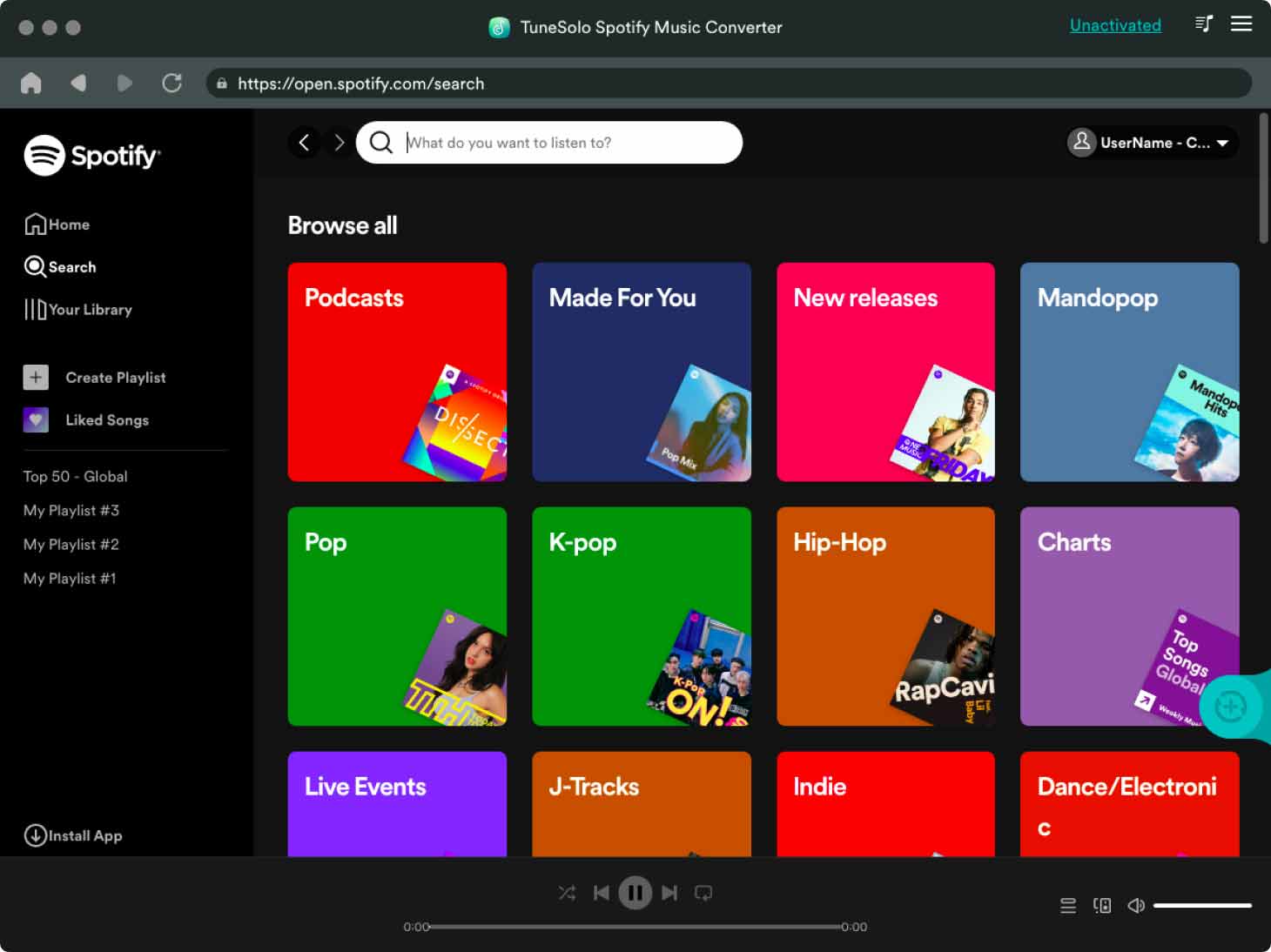
실행 TuneSolo Spotify Music Converter 기기에서 해당 URL을 복사하여 옵션 상자에 붙여넣거나, 선택한 항목을 직접 드래그 앤 드롭할 수 있습니다. Spotify 트랙을 추가할 수 있습니다. 1 또는 여러 트랙을 동시에 재생합니다.
3단계. 출력 설정
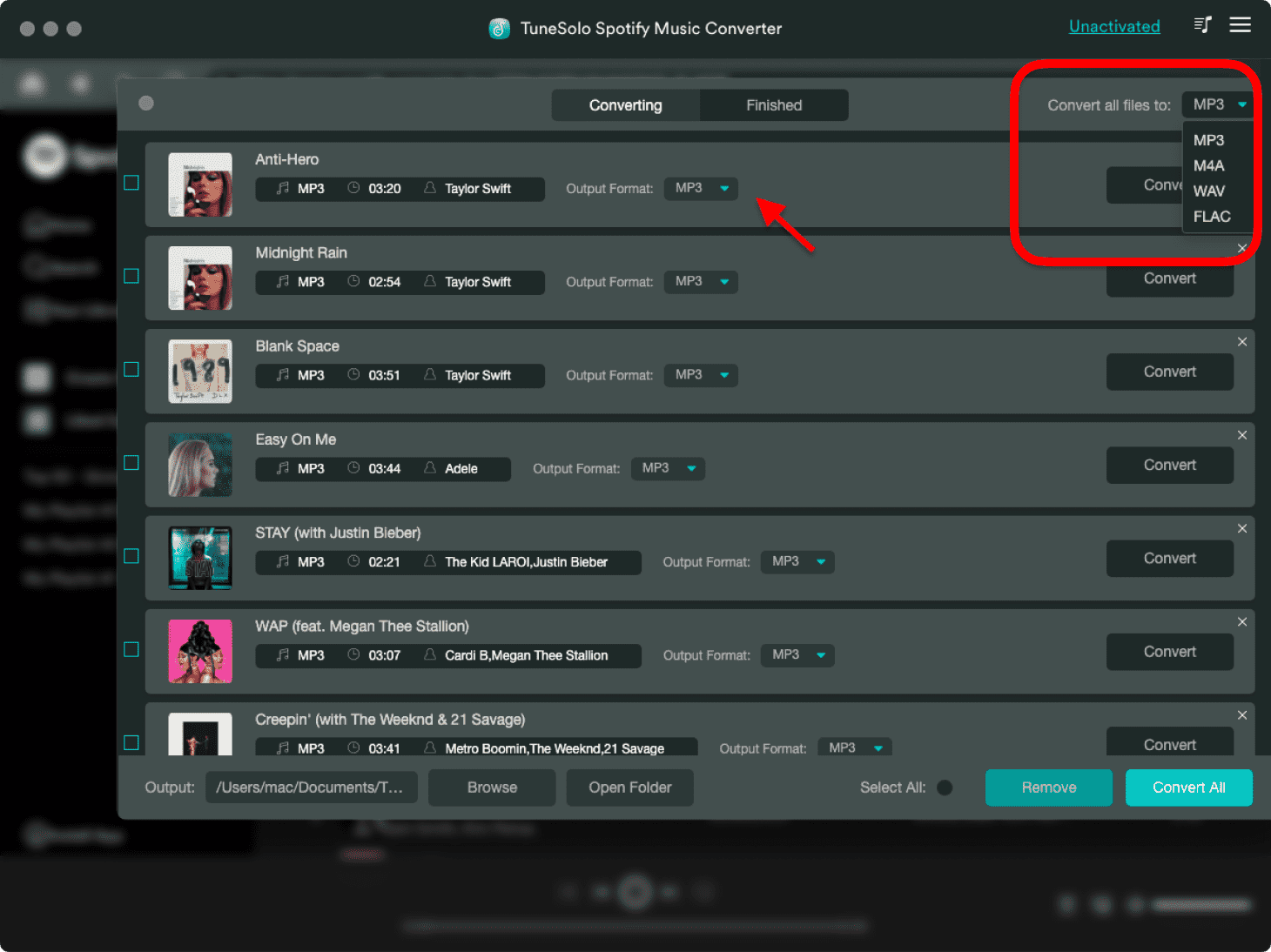
탐색 옵션 "다음으로 파일 변환:"에서 출력을 선택합니다.
4단계. 개 심자
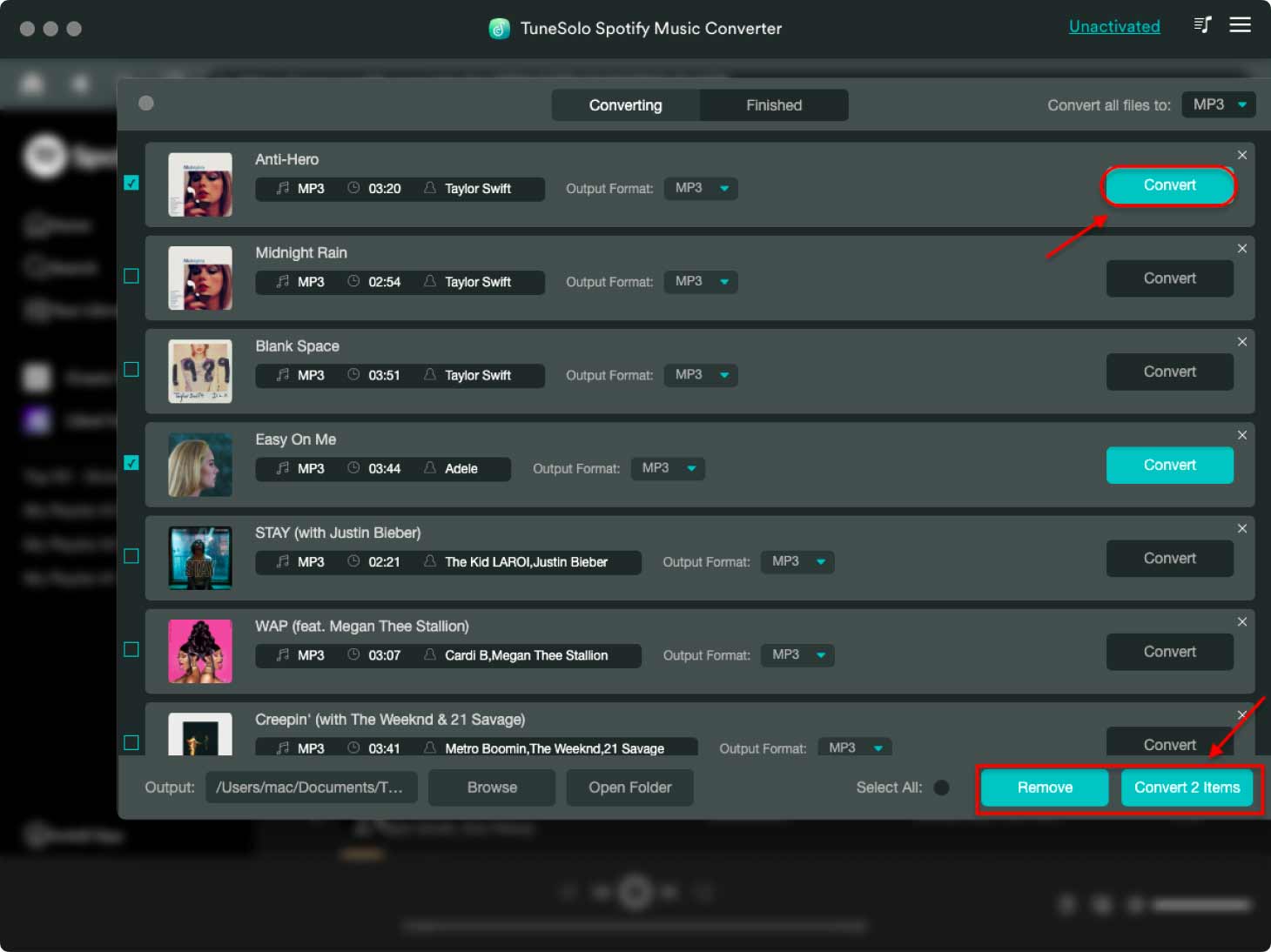
이전 단계를 완료했으면 "변환" 버튼을 클릭하고 다운로드가 완료될 때까지 기다릴 수 있습니다.
파트 2. 다운로드 Spotify Android/iPhone에서 Premium이 없는 노래
즐길 수 Spotify Music 인터넷 연결 없이 모바일 기기에서 사용하시더라도 걱정하지 마세요. 다운로드한 파일을 전송하면 됩니다. Spotify USB 케이블, Bluetooth 또는 기타 방법을 사용하여 컴퓨터에서 Android 또는 iOS 장치로 파일을 전송합니다. 이 과정이 복잡하다면 다음에서 음악을 다운로드하는 방법을 알려드리겠습니다. Spotify 아래 프리미엄 구독이 없는 Android/iPhone에서
다운로드하는 방법 Spotify APK 파일로 Android에서 프리미엄이 없는 노래
얻으려면 Spotify 비용을 지불하지 않고 노래 Spotify 프리미엄, 당신은 위반할 수 있습니다 Spotify 취득하여 신청 Spotify 프리미엄 APK 파일. 이를 통해 전체 세트의 잠금을 해제할 수 있습니다. Spotify 프리미엄 기능. Android 기기에서 노래를 다운로드하려면 Spotify 프리미엄 APK는 아래 안내를 참고하세요.
1단계. 당신이 Spotify Android 휴대폰에서 앱을 완전히 제거하세요.
2단계. 안드로이드 설정에서 "알 수 없는 소스" 설치를 허용했는지 확인하세요.
3단계. 수정된 버전을 다운로드하세요 Spotify 프리미엄 모드 APK 당신의 전화에.
4단계. 완벽한 프리미엄 계정에 로그인하세요 Spotify 계정. 그 후에는 다음에서 노래 다운로드를 시작할 수 있습니다. Spotify 다운로드 기능을 사용하여 Android 기기에서 무료로 다운로드하세요.
다운로드하는 방법 Spotify Music SpotiFlyer를 통해 안드로이드에서 프리미엄 없이 이용 가능
스포티플라이어는 Spotify 사용자의 다운로드를 도와주는 다운로더 Spotify 안드로이드 기기에 무료로 음악을 다운로드할 수 있습니다. 다른 음악 스트리밍 서비스에서도 음악을 다운로드할 수 있습니다. YouTube SoundCloud광고가 없어 방해 없이 앱을 이용할 수 있습니다. 복사 및 붙여넣기 기능을 지원하는 사용자 친화적인 소프트웨어입니다. Spotify Music 링크를 클릭하세요. "모두 다운로드" 버튼을 클릭하면 소프트웨어가 실행됩니다. 이제 작동 방식을 알아보겠습니다.
1단계. 먼저 안드로이드 기기에 SpotiFlyer 앱을 다운로드하고 실행하세요.
2단계. 엽니다 Spotify 다운로드하려는 노래의 URL 링크를 복사하세요.
3단계. SpotiFlyer로 돌아가세요. 검색창에 링크를 붙여넣고 검색 버튼을 클릭하세요.
노래를 다운로드하는 방법 Spotify Telegram을 통해 iPhone에서 프리미엄 없이
Telegram에는 사용할 수 있는 봇이 많기 때문에 봇을 통해 원하는 정보를 찾을 수 있습니다. Spotify 다운로드 도구. 이 다운로드 도구를 사용하면 다음을 제거할 수 있습니다. Spotify DRM 후 다운로드 Spotify iPhone으로 노래를 틀었습니다. 그것이 어떻게 작동하는지 봅시다.
1단계. 를 실행 Spotify iOS 기기에 앱을 설치하세요. 다운로드하려는 노래의 링크를 복사하세요.
2단계. 텔레그램을 열고 "를 검색하세요Spotify 노래 다운로더"
3단계. 텔레그램을 선택하세요 Spotify 목록에서 봇을 선택하고 "시작"을 누르세요.
4단계. 미리 복사해 둔 노래 링크를 검색창에 붙여넣고 "보내기" 버튼을 클릭하세요.
5단계. 마지막으로 '다운로드' 버튼을 클릭하세요. 제거 Spotify DRM, 그러면 다운로드할 수 있습니다 Spotify iPhone에 노래를 추가하세요.
파트 3. 에서 음악 다운로드 Spotify 프리미엄 없이 온라인 무료
항상 네트워크에 연결되어 있고 대부분 컴퓨터 앞에 있다면 이러한 온라인 서비스를 사용해 다운로드할 수도 있습니다. Spotify 프리미엄 구독 없이도 즐길 수 있는 노래들을 소개해 드리겠습니다. 최고의 곡들을 소개해 드릴게요. 2 온라인에서 확인할 수 있는 자료들이 있습니다. 그런 다음, 거기서 결정하시면 됩니다.
다운로드하는 방법 Spotify Soundloaders를 통한 무료 온라인 노래 Spotify 다운
Soundloaders는 사용자에게 다운로드할 수 있는 무료 서비스를 제공하는 온라인 음악 다운로더입니다. Spotify 컴퓨터에 노래를 보냅니다. 그것은 당신이 다운로드할 수 있습니다 Spotify 노래 MP3 비용을 지불하지 않고 간편하게 다운로드할 수 있습니다. 이 방법을 사용하면 컴퓨터에 추가 프로그램을 설치할 필요가 없습니다. 다운로드 방법을 알아볼까요? Spotify Soundloader를 통해 노래를 컴퓨터로 보냅니다.
1단계. 먼저 로그인하세요 Spotify 컴퓨터에서 앱을 사용하거나 Spotify 브라우저를 통한 플레이어 웹 페이지.
2단계. 음악 라이브러리에서 다운로드하고 싶은 음악을 찾으세요. 마우스 오른쪽 버튼을 클릭하세요. Spotify 노래를 선택하고 "공유"를 선택한 다음 노래 링크를 복사하세요.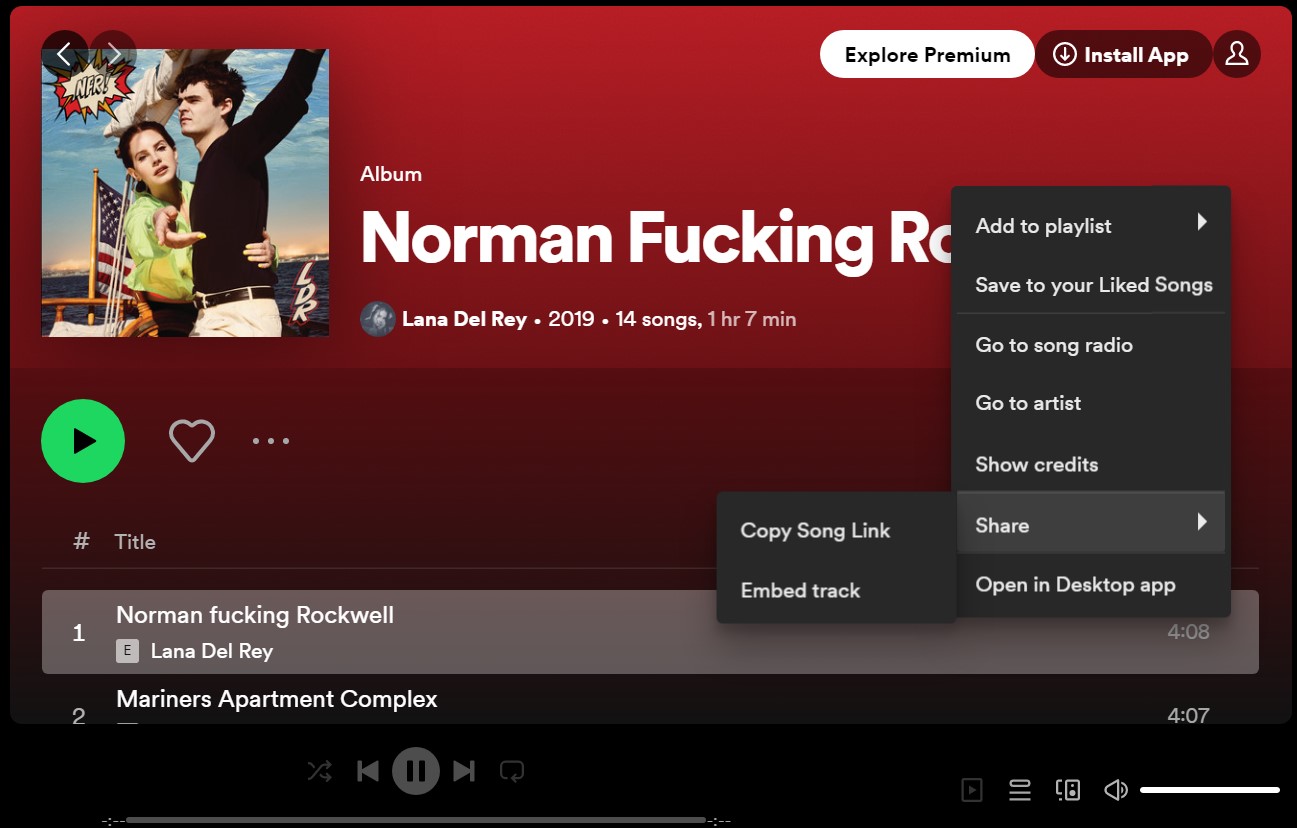
3단계. 사운드로더를 엽니다 Spotify 다운로더 웹페이지를 복사한 후 붙여넣기 Spotify 검색창에 노래 링크를 추가하세요. 그런 다음 "검색"을 클릭하십시오.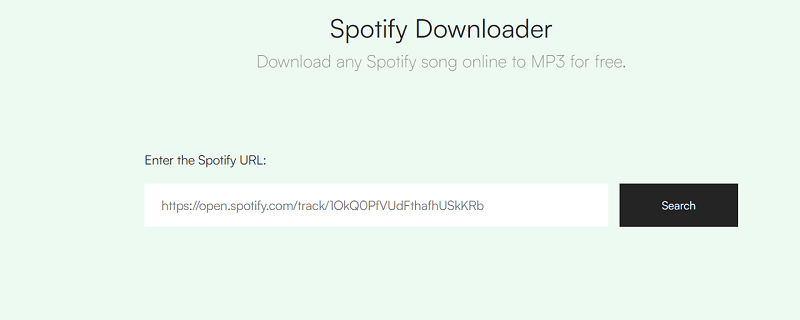
4단계. 그다음은 자세한 정보입니다. Spotify 검색한 노래가 표시됩니다. 곡 정보를 확인한 후 '다운로드'를 클릭하세요.
다운로드하는 방법 Spotify 무료 온라인 노래 Spotify항해사
SpotifyMate는 웹 기반 온라인 다운로드 도구입니다. 다운로드 및 변환이 가능합니다 Spotify Music 에 MP3 링크를 분석하여 형식을 지정합니다. Spotify 싱글과 재생목록. 이제 다운로드에 사용할 수 있습니다 Spotify 없는 노래 Spotify 프리미엄. 이 다운로드 도구를 사용하는 방법은 다음과 같습니다.
1단계. 열기 Spotify휴대폰이나 컴퓨터의 Mate 인터페이스.
2단계. 변환된 노래를 다운로드할 URL 링크를 복사하세요.
3단계. 복사한 링크를 붙여넣으세요 Spotify인터페이스를 메이트하고 "다운로드"를 클릭하세요. SpotifyMate는 붙여넣은 노래를 다운로드합니다. Spotify항해사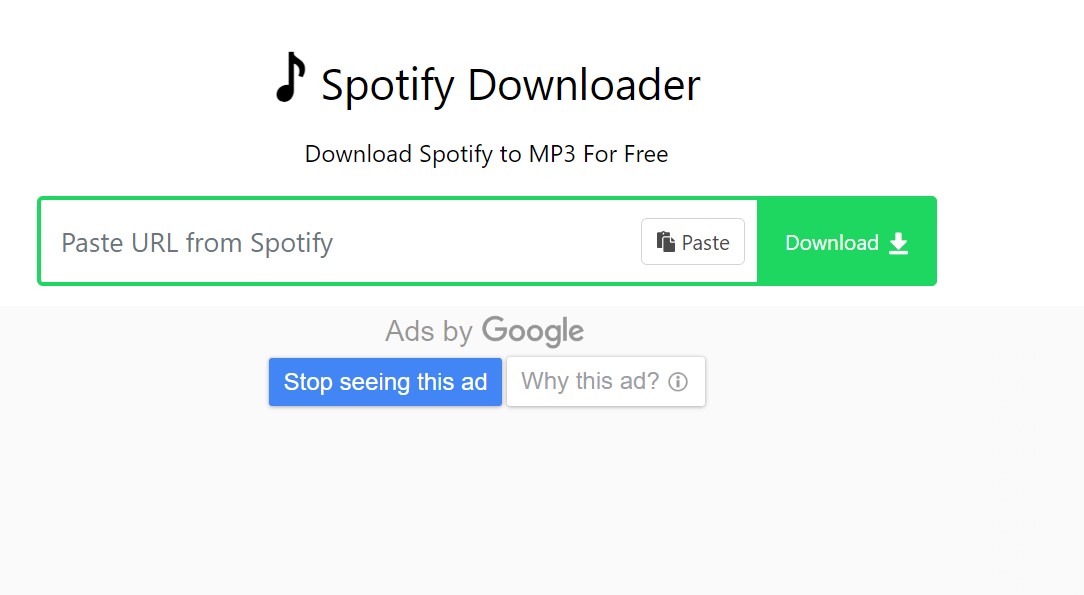
파트 4. 음악 다운로드 관련 FAQ Spotify 프리미엄없이
Q1: 노래를 다운로드할 수 있나요? Spotify 프리미엄이 없다면?
일반적으로 다음에서 노래를 다운로드할 수 없습니다. Spotify 유료 프리미엄 구독이 없는 경우. 프리미엄 회원이더라도, Spotify 앱은 DRM으로 보호되는 오디오 형식으로 암호화되어 있으므로 다른 앱이나 플레이어에서 재생할 수 없습니다. 하지만 이제는 다음과 같은 일부 타사 도구를 사용할 수 있습니다. TuneSolo Spotify Music ConverterSpotiFlyer 또는 Telegram Bot을 사용하여 다운로드하세요. Spotify 프리미엄 없는 노래.
Q2: 개별 곡을 다운로드할 수 있나요? Spotify?
그렇지 않습니다. Spotify 재생목록 다운로드만 허용합니다. Premium을 구독하더라도 다음에서 개별 노래를 다운로드할 수 없습니다. Spotify. 좋아하는 노래를 재생 목록에 넣은 다음 재생 목록을 다운로드해야 합니다. 하지만 지금은 TuneSolo 변환기, 개별 다운로드 가능 Spotify 컴퓨터에 노래.
파트 5. 맺음말
이 기사를 통해 실제로 구독하고 비용을 지불할 필요가 없는 이유를 찾았다고 확신합니다. Spotify. 선택하고 직접 시도할 수 있는 옵션이 많이 있습니다. 프리미엄 계정에 대한 비용을 지불하지 않아도 이 환상적인 앱을 무료로 오프라인에서 사용할 수 있다는 것은 의미가 있습니다. 덕분에 경험이 이보다 더 좋을 수 없었습니다. TuneSolo Spotify Music Converter.

