

免費Spotify轉MP3下載器【2026完整指南】
隨著音樂成為一種非常流行的娛樂來源,很多人正在使用諸如 Spotify, Apple Music, SoundCloud, and more. Users of Spotify 可以選擇帶廣告的免費服務。 或者,他們可以進行高級訂閱。 但是,他們想學習最好的 Spotify 到 MP3 下載器 的工具。
當然,如果您要使用工具,您需要確保它是安全的。 你不想要任何東西 惡意軟件或勒索軟件. 另外,您要確保免費 Spotify 到 MP3 下載器確實可以通過完成工作來工作。
因此,我們收集了最好的免費 Spotify 今天就可以獲得 MP3 下載軟件! 本指南將重點關注 2026 年排名前三的下載器。然後,我們將為您提供功能最少的在線下載器。
文章內容 第 1 部分。前 3 名 Spotify 致 3 年的 MP2026 下載者第 2 部分。 如何下載 Spotify To MP3 With TuneSolo?第 3 部分。在線和免費 Spotify 到 MP3 下載器部分4。 概要
第 1 部分。前 3 名 Spotify 致 3 年的 MP2026 下載者
在本節中,我們將討論付費或免費 Spotify 到 MP3 下載工具。 通常,免費 Spotify MP3 下載器軟件將提供有限的功能。 因此,我們將列出前三個下載器,第一個是所有下載器中最好的。
No. 1: TuneSolo Spotify Music Converter
One option, available as a free trial and a paid license, is TuneSolo Spotify Music Converter。 這是最好的 Spotify downloader out there. With this tool, you can download Spotify Music for free. You can test out the tool by going for the free trial.
一旦您對該工具感到滿意,您就可以購買適用於 Windows 或 macOS 的版本,具體取決於您計算機的操作系統。 如果您這樣做,您將有權獲得終身免費更新甚至高級技術支持。
這個 Spotify 下載器通過其轉換確保優質。 完成無損壓縮和轉換,使您能夠聆聽高質量的曲目。 因此,您不必擔心獲得不清晰或無法理解的曲目。
TuneSolo Spotify Music Converter is speedier than the standard free Spotify 到 MP3 下載器。 下載和轉換過程輕而易舉,因此您不必等待很長時間。 另外,您可以選擇轉換單個曲目甚至多個曲目。 可以進行批量轉換。
Once the conversion is complete, you will be surprised to know that the metadata and ID3 tags are kept. The song details such as artwork, album, title, genre, year, and more, are preserved. Thus, organization of data isn’t a concern.
Finally, TuneSolo Spotify Music Converter offers a slick and easy way to grab your favorite tracks. You can 轉換為多種文件類型,例如 MP3 和WAV。 另外,您甚至可以選擇保存文件的文件夾以進行組織。
第 2 名:Sidify 音樂轉換器
Sidify 音樂轉換器不是免費的 Spotify 到 MP3 下載器,但仍然值得放在這個列表中。 要訪問該工具的全部功能,您必須支付許可證費用。 像其他工具一樣,它可以幫助您從 Spotify.
Supported formats include MP3, WAV, and FLAC, among others. The website specifies that the tool is for personal or home use only. Like TuneSolo, it has versions for Windows and macOS. According to their website, their tool supports up to 46 different languages, including English.
Sidify Music Converter 在下載和轉換速度方面也非常快。 除此之外,歌曲信息被保存。 因此,ID3 標籤被保留用於組織。 最新版本的 Sidify 可以在新的 Windows 11 上運行。但由於新的操作系統還為時過早,我們對此並不確定。
除了一個 Spotify 下載器,Sidify 音樂轉換器還有其他工具。 一方面,您可以使用該平台刻錄 CD。 但是,您需要有一個支持 CD 或 DVD 刻錄或寫入的光驅。 另一個功能是上傳器。 使用該工具,您可以立即將曲目上傳到雲存儲平台 OneDrive。
No. 3 UkeySoft Spotify Music Converter
Another non-free Spotify to MP3 downloader is UkeySoft Spotify Music Converter. Like the other two tools here, it is available on both macOS and Windows PCs. It is made specifically, for getting tracks from Spotify. It cannot be used on Apple Music.
此下載器將幫助您從 Spotify 同時確保 ID3 標籤完好無損。 因此,即使沒有 Internet 連接,您仍然可以播放曲目。 它支持多種輸出格式,如 MP3、WAV、OGG、AIFF、FLAC 和 M4A。
它允許您保存音樂並更改設置。 例如,您可以修改編解碼器。 如果需要,您還可以選擇比特率。 它將介於 128Kbps 和 320Kbps 之間。 與其他工具一樣,您可以將曲目從一台設備傳輸到另一台設備。
Batch conversion is also possible with UkeySoft Spotify Music Converter. Typically, you simply have to drag the songs and drop them on the interface of the app. Like TuneSolo Spotify Music Converter, this tool helps 刪除DRM限制 從軌道。 因此,您可以獲得不受任何加密方法保護的曲目,以便您可以自由使用它們。
第 2 部分。 如何下載 Spotify To MP3 With TuneSolo?
那麼,轉換的最佳方法是什麼 Spotify tracks to your universal file type MP3? Well, it’s through TuneSolo Spotify Music Converter. Here are the steps on how to use it:
- Grab And Install The Tool. First, visit the website of TuneSolo and download the Spotify Music Converter. Use the installer to place the app on your computer.
- 打開工具。 啟動該工具並確保您位於主界面中。
- Add Tracks. Now, select the tracks, playlists, or albums you want to grab. You can drag or drop them. Another way to do this is by copying the link of that track (or album) and pasting it on TuneSolo Spotify Music Converter.
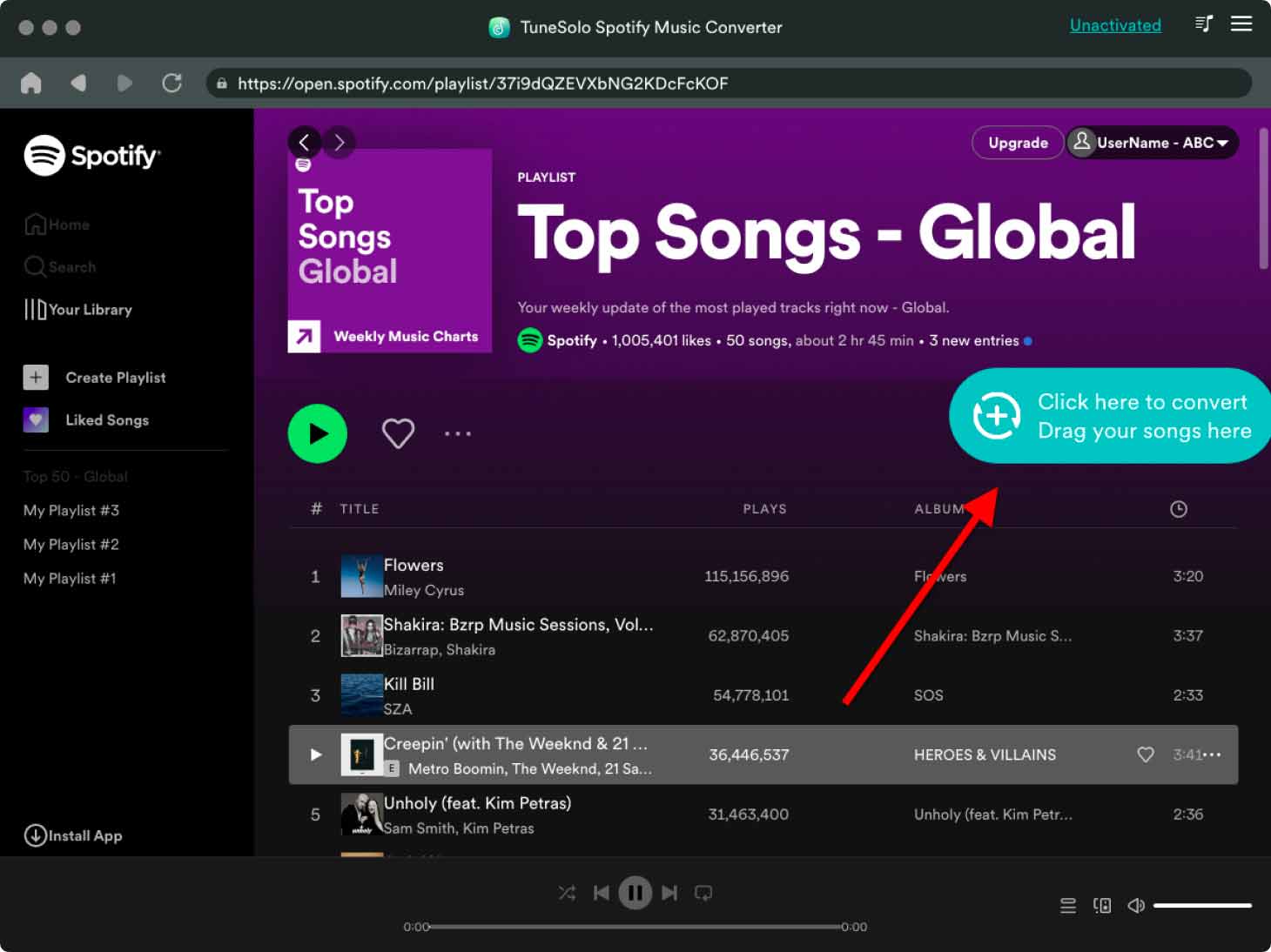
- 修改設置。 現在,您可以選擇所需的文件類型。 建議您選擇 MP3。 之後,通過瀏覽選擇一個輸出文件夾。
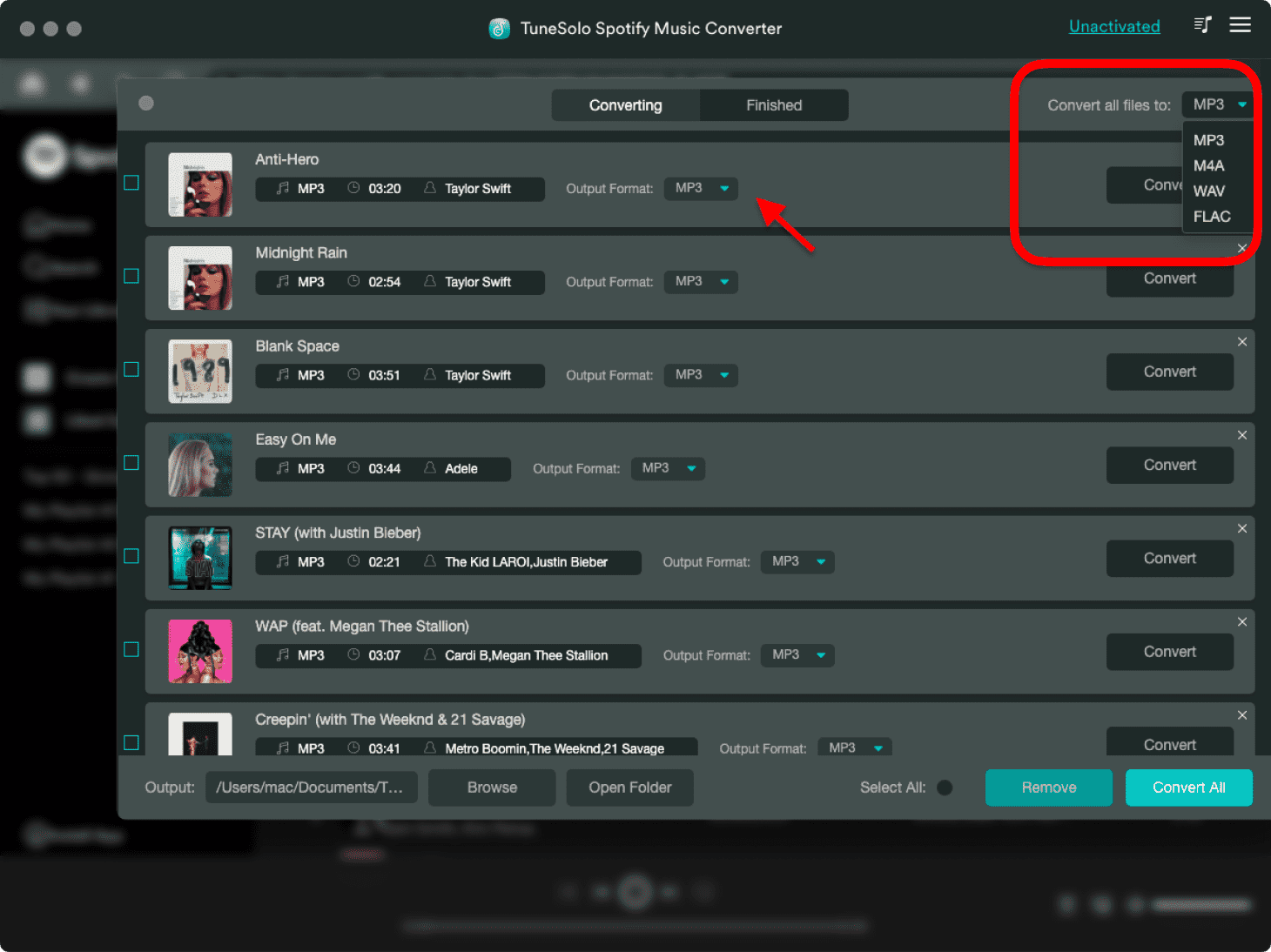
- 轉換曲目。 單擊底部的“全部轉換”大按鈕以轉換曲目。 等待轉換完成。
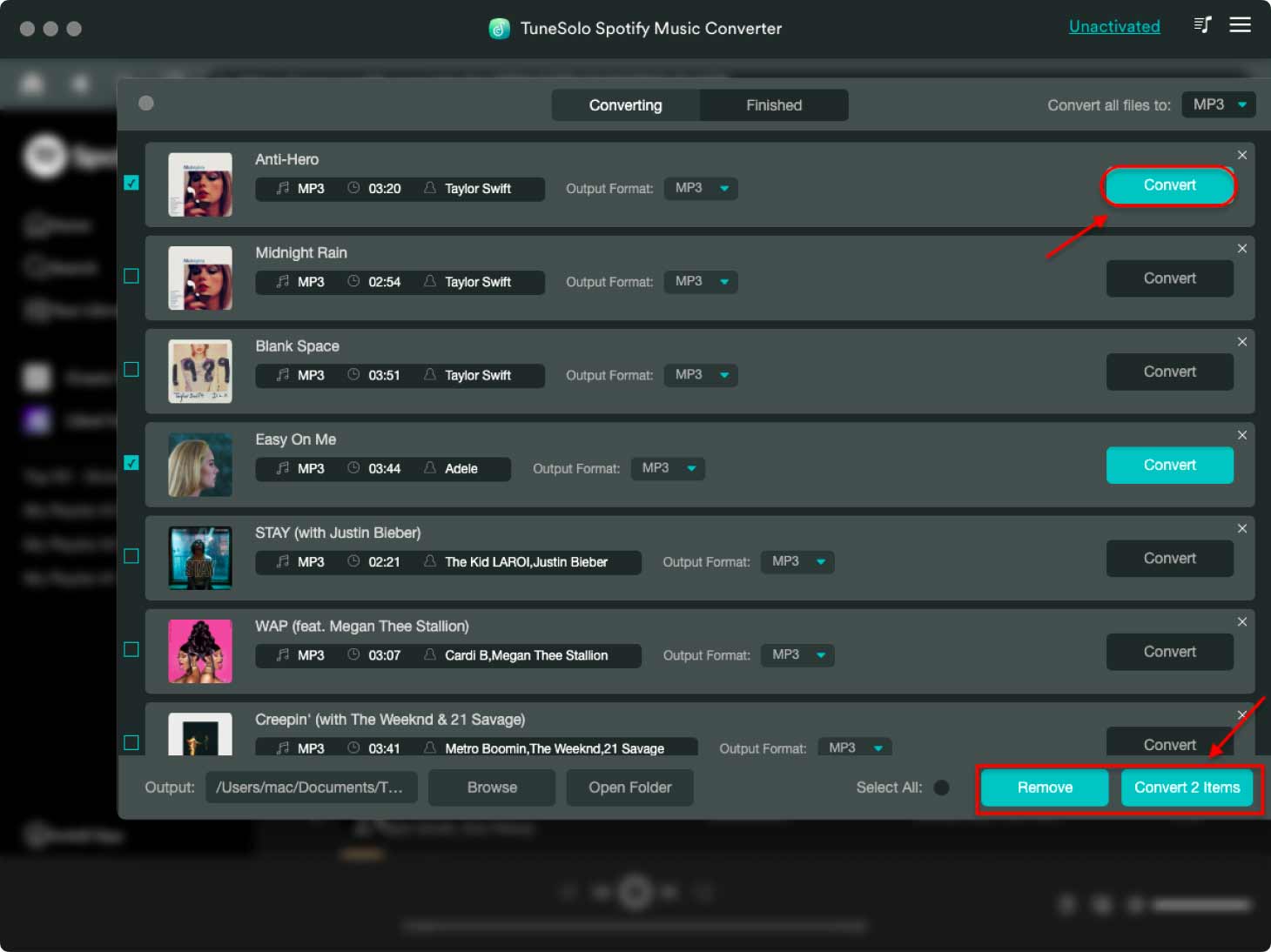
- 查看文件。 現在,在轉換完成後單擊查看輸出文件按鈕。 這將帶您進入您在本指南的第四步中選擇的文件夾。
第 3 部分。在線和免費 Spotify 到 MP3 下載器
現在,我們將談論在線和免費 Spotify 到 MP3 下載工具。 你會發現在線轉換器並不那麼可靠。 他們中的大多數根本不工作。 因此,您最好的選擇是在線錄音機,以幫助您錄製曲目 Spotify 並將它們保存為 MP3。
顯然,這將是一項非常繁瑣的任務。 不幸的是,現在沒有真正的基於 Web 的工具可以將曲目從 Spotify 到 MP3。 這就是為什麼我們將在下面列出您可以使用的前兩個在線錄音機:
#1。 Online-Voice-Recorder.com
Online-Voice-Recorder.com 不一定是免費的 Spotify 到 MP3 下載器。 它實際上是一個在線錄音工具,可以幫助您從 Spotify. 歌曲通過麥克風錄製並保存為 MP3 文件。
您可能會注意到,這不是從 Spotify. 這是因為麥克風可以錄製來自外部揚聲器的低質量聲音。 此外,它還可以記錄背景噪音。 所以,你沒有得到干淨的錄音 Spotify track. As such, we recommend that you use TuneSolo Spotify Music Converter instead.
#2。 說話管
說話管 is another tool you can use to convert Spotify tracks to MP3. It can be easily accessed through its website online. You can use the tool to record the tracks using your computer or smartphone. Simply put your microphone near the external speakers of your computer.
就像第一個基於網絡的工具一樣,所產生的聲音質量並不是那麼好。 此外,錄製數千首曲目是不可能的,因為您沒有太多時間一遍又一遍地錄製您想要的所有內容。 因此,如果您想要在線免費,這些在線錄音工具是您的最佳選擇 Spotify 到 MP3 下載器。
部分4。 概要
本指南為您提供最高收費和免費 Spotify 到 MP3 下載工具。 第一部分提供了當今可用的三大工具。 接下來我們講了怎麼搶 Spotify and convert it to MP3 using the steps with TuneSolo Spotify Music Converter.
下一節將是關於免費的 Spotify to MP3 downloader online tools. As you can see, these free web-based tools have limitations. For instance, some have a low-quality output. Others have limits in terms of the size you can download.
As such, the best downloader is TuneSolo Spotify Music Converter. It offers all the things you need in a free Spotify 到 MP3 下載器,還有更多! 您甚至可以通過免費試用對其進行測試。 購買該工具後,您有權獲得終身更新和技術支持!

