
Passo 1.
Drag your local AAX or AA audiobook into TuneSolo for automatic detection and metadata display.
Use o Audible Converter para converter livros AA/AAX Audible em MP3 sem DRM, com capítulos preservados e sem restrições de dispositivo.
Mac Wine Folly

Baixe músicas de todos os tipos

Velocidade de download 35 vezes mais rápida

Converter Spotify para MP3

Melhor qualidade musical garantida

Predefinição de preservação de tags ID3 e classificação de música
Read on for a rundown of all the features of TuneSolo Deezer Music Converter to learn how to maximize your music listening experience and fine-tune how you use Deezer.
Converta facilmente Audible AAX/AA to MP3 with One Click
After installing TuneSolo Audible Converter, you can effortlessly remove DRM from your Audible AAX or AA files, allowing you to enjoy them on various media devices. The tool simplifies the entire process, eliminating the need for additional software like iTunes. Simply drag and drop your Audible files into the app, and TuneSolo Audible Converter takes care of the rest without requiring Audible account authorization.

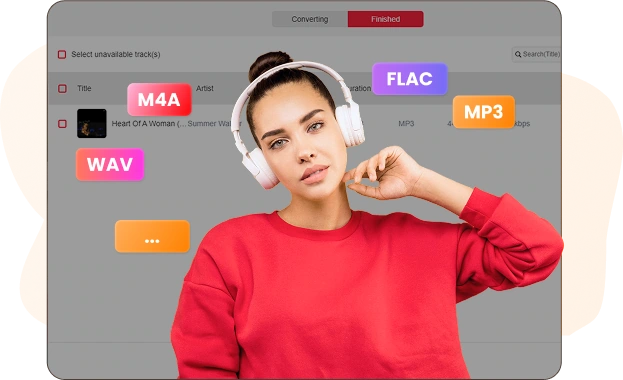
Vários formatos de saída para se adequar aos seus dispositivos.
If your device doesn't support AA or AAX formats, TuneSolo Audible Converter makes it easy to convert your Audible books into MP3, M4A, FLAC, or WAV formats. This allows you to enjoy your Audible content on devices like MP3 players, iPods, Sony Walkmans and PSP, freeing your audiobooks from the Audible app's restrictions.
Preservar informações do capítulo e tags ID3
Concerned about losing chapter details after conversion? TuneSolo Audible Converter ensures that chapter information is fully preserved, so you can track your audiobook progress easily. If you'd like to update the metadata, such as changing the book cover or title, you can use the built-in ID3 tag editor to make adjustments.

Enjoy 60X Faster Conversion Speed & Retain 100% Original Quality
With TuneSolo Audible Converter's advanced decryption technology, you can convert Audible audiobooks at up to 60X speed. If maintaining sound quality is important, you can switch to the "Lossless" mode to ensure the converted files retain the original audio quality. Additionally, you can customize various settings, such as bitrate, sample rate, and chapter split, to suit your preferences.

Divida facilmente audiolivros em capítulos, duração ou segmentos.
TuneSolo Audible Converter offers a simple solution for managing large audiobook files by allowing you to split them into smaller, more manageable segments. Whether you prefer to split your Audible AAX/AA books by specific time intervals, individual chapters, or even a combination of both, this tool provides the flexibility to organize your audiobooks in a way that suits your preferences. You can also choose to divide the books into multiple segments of equal size, making it easier to store and navigate through your Audible library without dealing with unwieldy, oversized files.
Características excepcionais do TuneSolo Audible Converter

Ampla compatibilidade
Desempenho suave no Windows e no macOS graças à sua integração perfeita.

Suporte para vários idiomas
English, Japanese, German, Polish, French, Spanish, Chinese, and so forth are all supported by TuneSolo.

Conversão em lote
You may save time and work by converting numerous AA/AAX Audible books at once using batch conversion.

Opções adaptáveis para personalização de áudio
For simpler administration and storage, you may divide huge audiobooks into equal parts, chapters, or time segments with TuneSolo Audible Converter.

Conversão extremamente bem-sucedida
For audiobooks, Extremely Successful Conversion achieves a higher conversion rate of 98%.
Como usar o TuneSolo Audible Converter?
Passo 1.
Drag your local AAX or AA audiobook into TuneSolo for automatic detection and metadata display.
Passo 2.
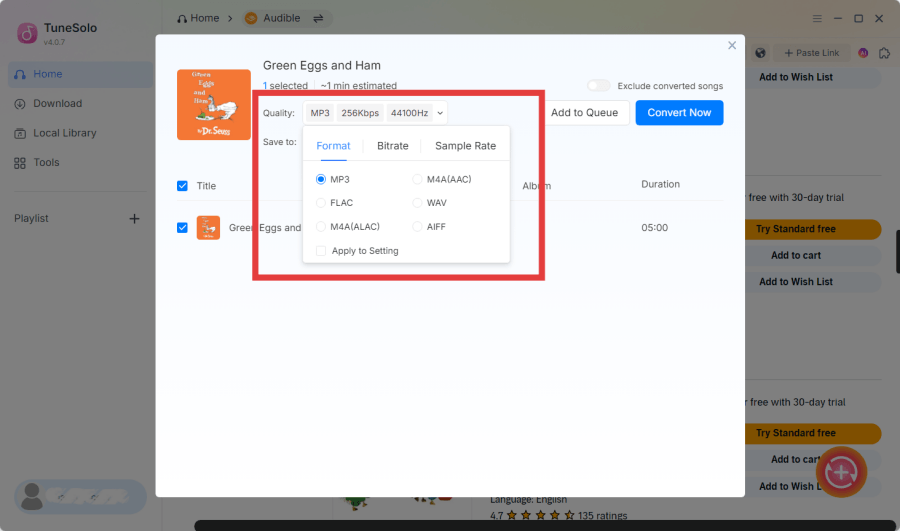
Escolha uma pasta de saída e um formato (MP3, M4A, FLAC ou WAV) para uma conversão de alta qualidade.
Passo 3.
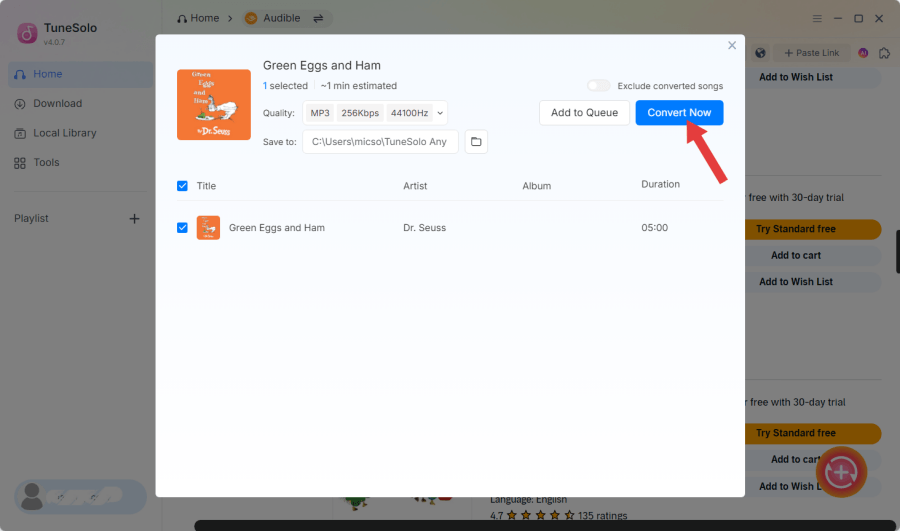
Clique em “Converter tudo” para iniciar a conversão ou use “Converter” para audiolivros individuais.
Avaliações do TuneSolo Audible Converter

"This converter has completely streamlined my audiobook collection! I can now enjoy my Audible books offline without any DRM restrictions. The process is fast and easy, and the quality is top-notch. If you're an audiobook lover, this is a must-have tool!"

Produtor de podcasts
James Lee
"As a content creator, I love how simple and efficient this tool is! It allows me to convert Audible audiobooks into various formats for all my devices. The conversion speed is incredible, and the quality is pristine. Definitely worth it for anyone who listens to audiobooks regularly."

YouTuber
Sarah Nguyen
"I’ve been searching for an easy way to convert and enjoy my Audible audiobooks on all my devices, and this tool is perfect! The app is easy to navigate, and the audio quality is amazing. I’m especially impressed with the fast conversion speed. Highly recommend!"

Blogger
Mark Wilson
O mais útil Audible Converter Vale a pena experimentar
Você já usa o Spotify há muito tempo? Baixe e instale gratuitamente o TuneSolo Spotify Music Converter para ter uma experiência musical completamente nova.
Requisitos de sistema:
Windows 7 ou posterior em 64 bits
Mac OS X 10.11 ou superior
Preço:
A partir de $ 13.95 / mês
Veja mais planos valiosos >>>
Áudio de entrada suportado:
Músicas Pandora Music, listas de reprodução,
álbuns, etc. álbuns
Formatos de saída suportados:
MP3, M4A, FLAC, WAV.
Perguntas frequentes
Posso usar o TuneSolo Audible Converter gratuitamente?
Sim, você pode. O TuneSolo Audible Converter oferece uma versão de avaliação gratuita e uma versão profissional para todos os usuários. A versão de avaliação gratuita permite que você avalie o software completamente antes de fazer um pedido. Se você ficar satisfeito com o uso, poderá comprar a licença para atualizar para a versão profissional.
Quais são as limitações de uma versão de teste gratuita?
Você só pode usar o teste gratuito por 15 dias e apenas 2 audiolivros podem ser convertidos completamente.
Posso obter um desconto na compra do software TuneSolo?
Você pode acompanhar o site oficial do TuneSolo para receber notícias sobre mais ofertas e descontos em tempo real. Ou você pode entrar em contato com a equipe de suporte ([email protected]) para mais detalhes sobre alguns eventos especiais realizados por TuneSolo.
Can I download books from Audible directly with TuneSolo?
No, TuneSolo Audible Converter doesn’t download books directly from Audible. You first need to download your Audible AAX or AA audiobooks through the Audible app or website and save them locally on your computer. Once downloaded, you can then use TuneSolo to convert them into other formats for offline listening on various devices.
Does TuneSolo Audible Converter preserve quality?
Absolutely, TuneSolo maintains the original audio quality, ensuring lossless conversion of Audible books.
Posso usar minha licença em dois ou mais computadores?
Normalmente, uma chave de licença só pode ser usada em um dispositivo. Mas se você encontrar uma emergência, como trocar ou redefinir o dispositivo e não conseguir fazer login, você pode entrar em contato com a equipe de suporte ([email protected]) e fornecer as informações válidas do seu pedido, eles ajudarão você a transferir a licença para um novo dispositivo.
Funções
Popular
Suporte
Copyright © 2026 TuneSolo. Todos os direitos reservados.

Não hesite mais
Novos usuários podem aproveitar um desconto de 30% na assinatura do primeiro mês!
