Effortlessly Convert Spotify to Common Formats in Original Quality

如何运作
介绍图片

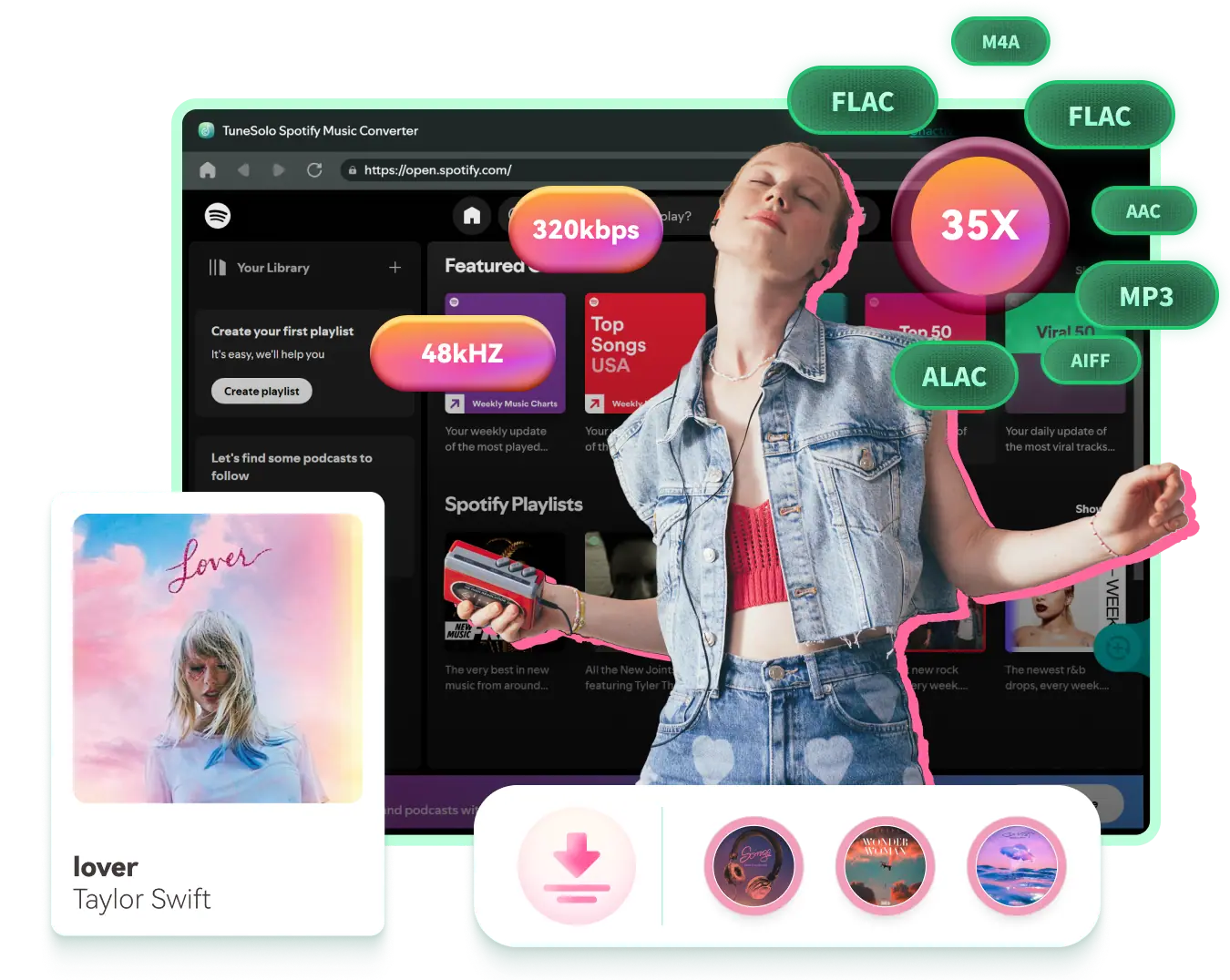
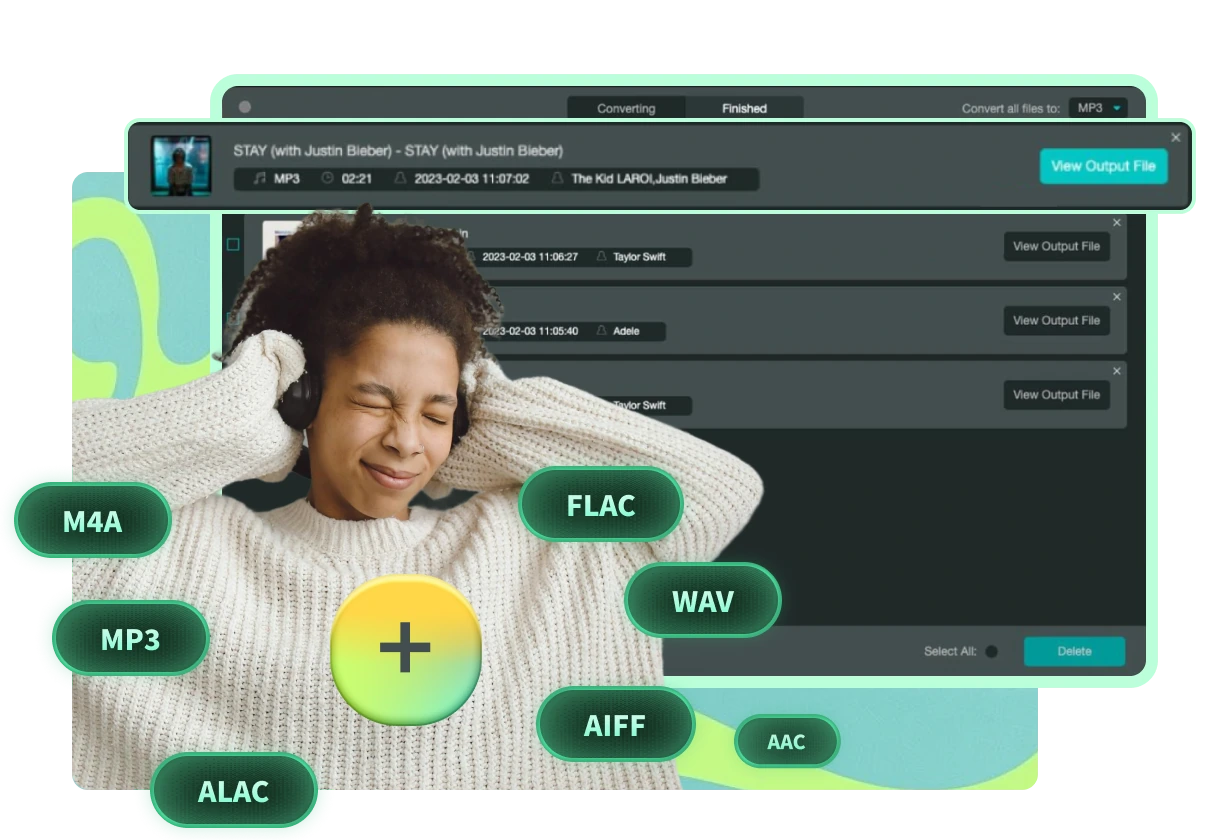
包含的输出格式:MP3、M4A、WAV、FLAC、AIFF、AAC、ALAC

Downloads from Spotify Premium are in OGG Vorbis format which can only be recognized by its official app. TuneSolo Spotify Music Converter provides more common format options than online Spotify downloaders, which normally support MP3 only.

Diverse DRM-free output formats can be exported via TuneSolo, including MP3,M4A, FLAC、WAV、AIFF、AAC 和 ALAC。对于普通格式的歌曲,您可以轻松共享、编辑或传输它们。
注: AAC 和 ALAC 是 M4A 的两种编解码器类型。前者提供有损音频,文件大小较小,后者提供无损音频,文件大小较大。
介绍图片

最佳音频质量:以原始质量保存歌曲或对其进行自定义

Besides ease of use and efficiency, TuneSolo Spotify Music Converter can preserve high audio quality after conversion. Unlike online Spotify downloaders or Spotify recorders, which can degrade sound quality due to the recording nature, TuneSolo maintains the original music quality in converted audio.

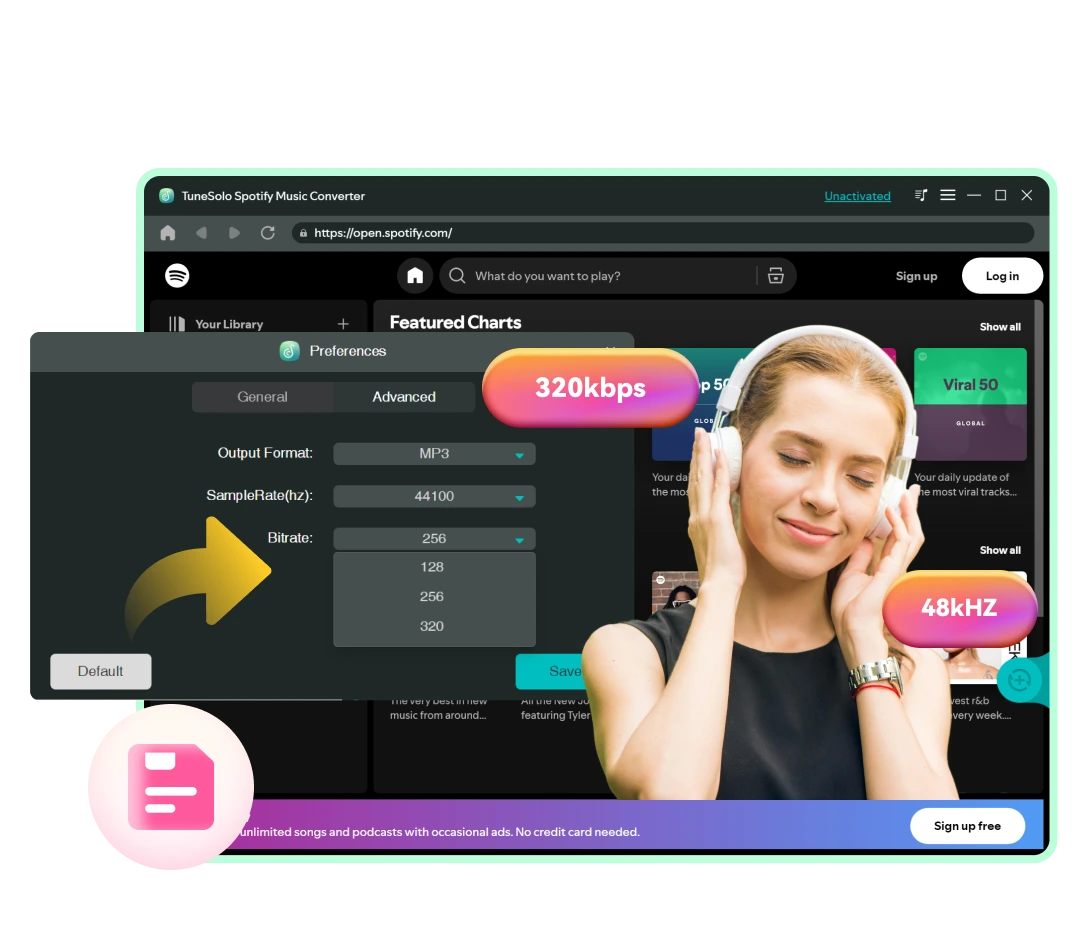
To download Spotify Music in high quality, you can change the quality setting to 320kbps, 48000hz in MP3. If you need audio in lossless quality, output it in WAV or FLAC.

注: TuneSolo lets you change the sample rate from 22050hz to 48000hz and adjust the bit rate from 128kbps to 320kbps to match your source music.

Download Any Type of Audio Content from Spotify Losslessly

This Spotify Music Converter lets both users of Spotify Free and Spotify Premium quickly convert and download any type of audio content from Spotify.

幻灯片图片

歌曲和播放列表

搜索各种类型的歌曲或播放列表,从嘻哈歌曲和爵士乐到摇滚歌曲和古典音乐,然后直接下载为 MP3 格式。

幻灯片图片

相册

只需导航到艺术家的页面并显示所有专辑,您就可以使用这款功能强大的 Spotify Music Converter 下载它们。

幻灯片图片

播客和节目

This Spotify podcast downloader lets you 下载任意播客的每一集 并立即显示为音频文件。

幻灯片图片

有声读物

TuneSolo Spotify Music Converter also allows you to download all chapters from an audiobook that is in the Spotify library.

Your Go-to Spotify Converter with Superior 35X Faster Download Experience

TuneSolo Spotify Music Converter 使您能够以闪电般的转换速度轻松完成下载任务。

幻灯片图片

Download Spotify Songs at Least 35X Faster Speed

先进的硬件加速技术,音乐下载速度提升35倍,远超市面上其他软件,在稳定的网络环境下,一首3分钟的歌曲,5秒即可下载完成!

幻灯片图片

Embedded Spotify Web Player Available

You don't need to install the Spotify desktop client on your computer. The built-in Spotify web player on this Spotify Music Converter lets you access the Spotify library and your own library just like on the original. Music streaming and downloading can be fulfilled all at one stop with this Spotify converter.

幻灯片图片

拖放简化操作

不再需要复制和粘贴烦人的链接!打开所需内容,只需拖放即可轻松下载。或者直接点击“添加到转换列表”按钮,添加播放列表或专辑中的所有歌曲进行转换。

令人印象深刻的 ID3 标签保存和个性化下载管理

介绍图片

保留原始音乐元数据和 ID3 标签

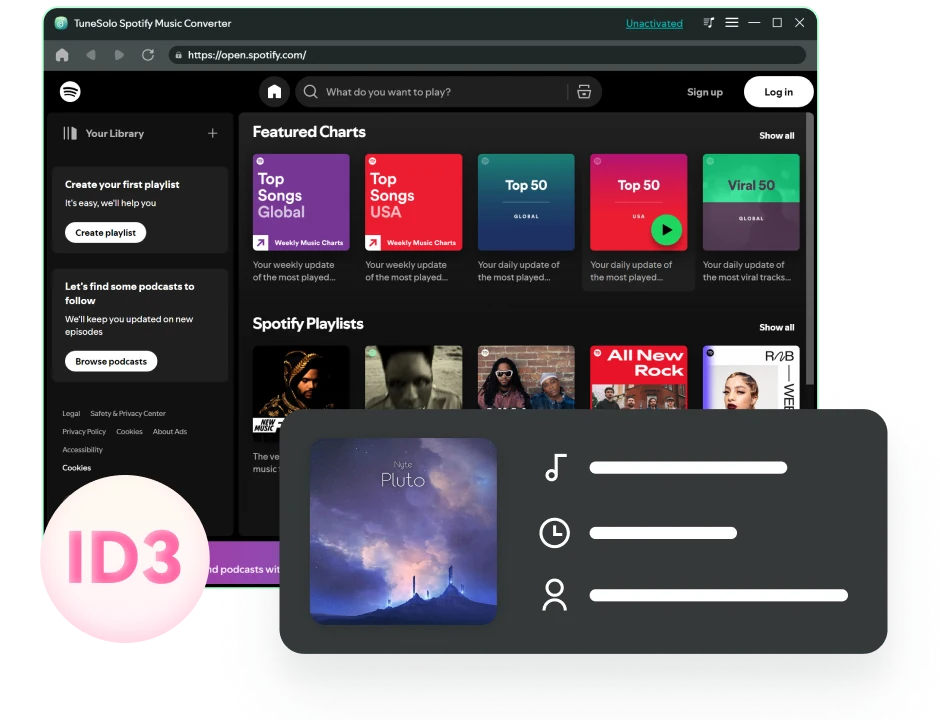
To better manage and organize your music collection, this Spotify converter can smartly identify the original ID3 tags of your added online music. This function is much more convenient than using an audio recorder, which requires manually setting up metadata for audio files.

使用 TuneSolo,歌曲详情(包括标题、艺术家、曲目 ID 和专辑封面)在转换后可以完整显示并保留。在 iPod Shuffle、车载播放器或其他离线设备上播放时,歌曲信息可以清晰地显示在屏幕上。
介绍图片

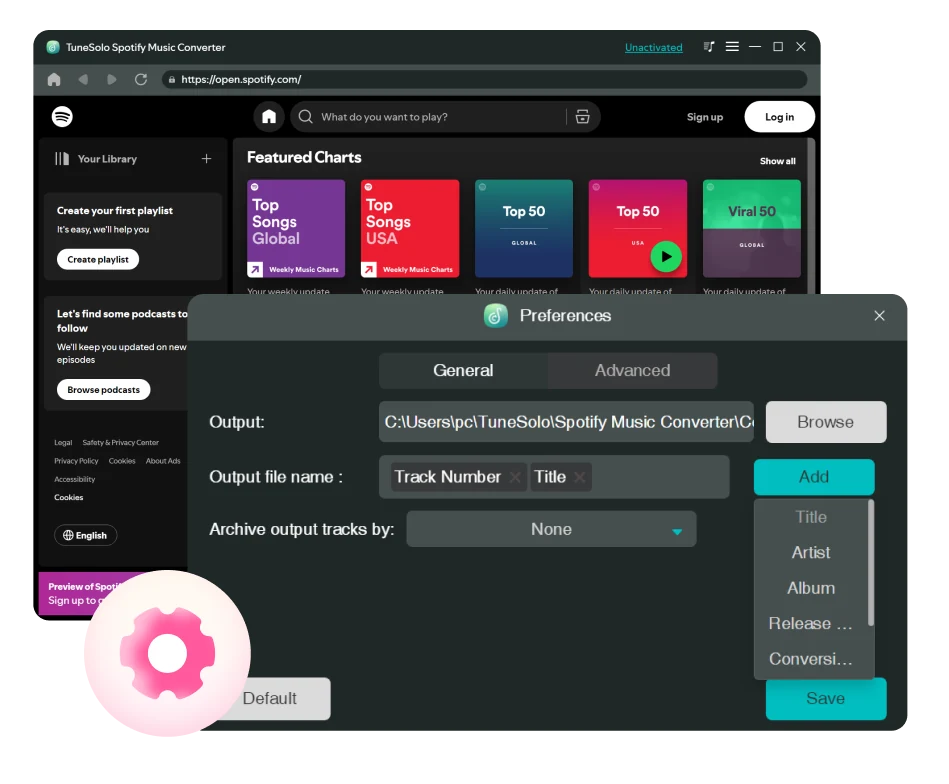
自定义音频文件标题和文件夹存档的输出预设

Better yet, this program also enables you to preset the file title for the downloaded audio by ID3 tags such as song title, artist, album, etc. to classify your Spotify downloads.

此外,该音乐下载器还能够根据您在偏好设置中预设的规则,自动将您下载的歌曲存档在默认文件夹、播放列表、艺术家、专辑等中。

有了这些功能,您不再需要手动将下载的歌曲一首一首整理!

使用 TuneSolo Spotify Music Converter 的好处
幻灯片图片

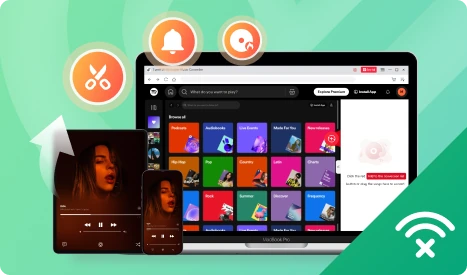
在多个设备上畅享 Spotify Music 或灵活使用它们

后 converting Spotify songs to MP3, you can listen to them offline on various devices and players, such as the Windows 媒体播放器, VLC, Virtual DJ, iPod Shuffle, Apple Watch, etc.

此外,使用纯音频文件,您可以将其设置为铃声或闹铃声、进行混音、编辑以制作音乐片段、将其嵌入 PPT或视频中等等。

幻灯片图片

永久免费将 Spotify Music 保存到存储设备

Once an artist terminates the collaboration with Spotify, you can no longer listen to their songs on Spotify. Downloading Spotify songs to MP3 or other common formats makes it possible to 永远保留歌曲.

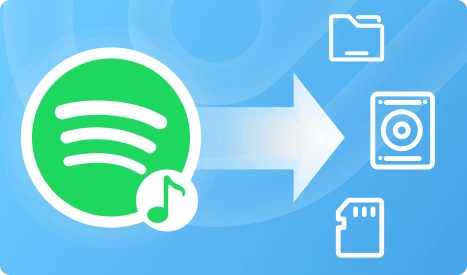
下载后,您可以将其上传到云存储、外部硬盘、USB 或 SD 卡并轻松备份。

额外功能创造非凡

直观的多语言界面

Supporting English, Japanese, German, French, and Chinese, this Spotify downloader has a stupid-simple UI design that makes it easy to use for everyone.

曲目搜索功能

在“转换中”或“完成”界面,您甚至可以搜索歌曲的标题来精确地找到歌曲。

内置歌曲播放器

On the in-built Spotify web player, you can easily manage your songs and even play them on this music converter.

列表顺序排序

在“转换”窗口中按歌曲名称、艺术家、专辑或持续时间对歌曲进行排序,以在开始之前更改转换顺序。

音乐转换过程控制

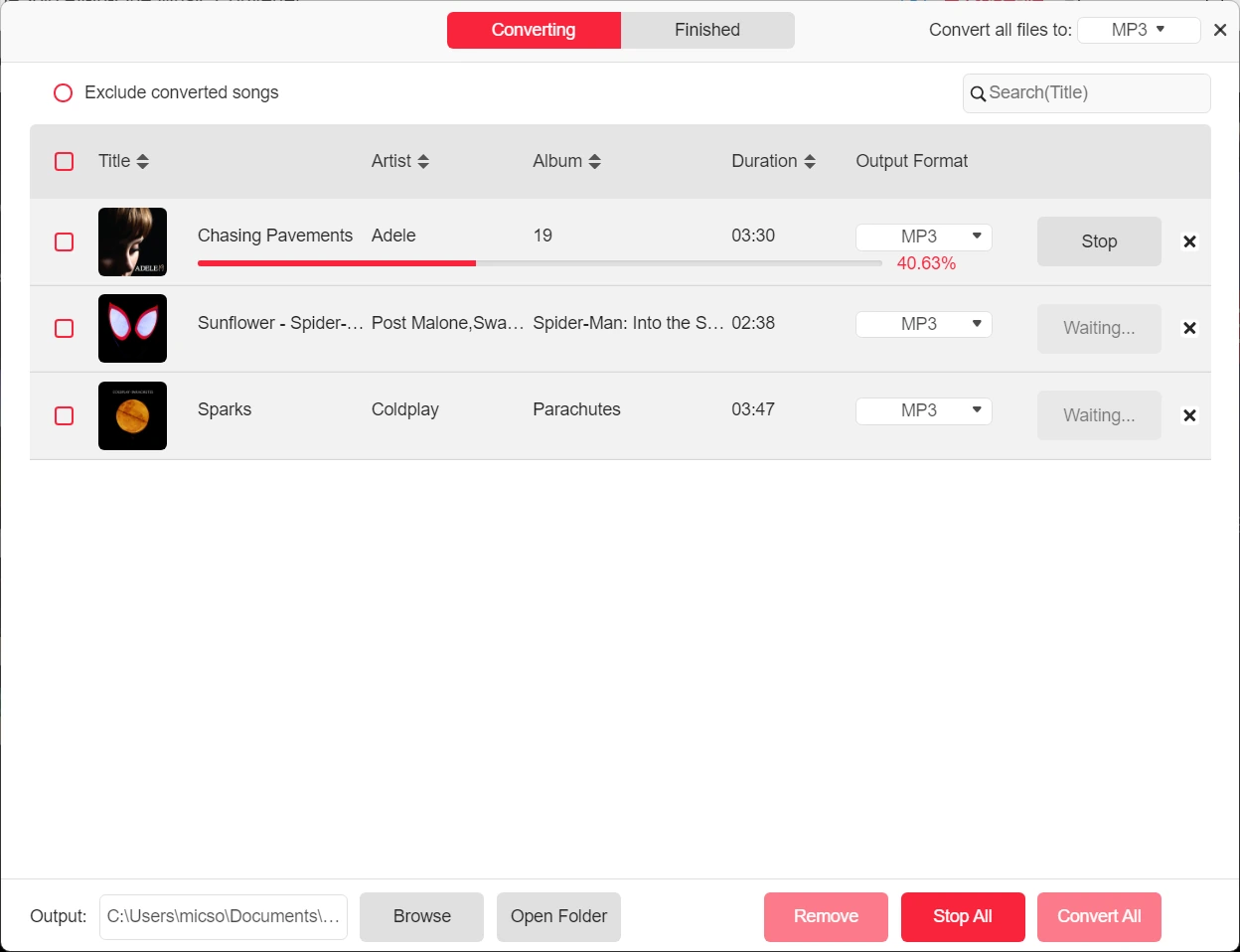
转换列表中的每个项目都提供了停止/重新启动按钮,以便您可以停止一首歌曲的转换过程并开始另一首歌曲的转换。

软件缓存清除

Built in with the Cache clear option, this software enables you to free up the storage or resolve some bugs without erasing Spotify downloads and your activation records.

可靠的技术支持

TuneSolo focuses on Spotify updates and upgrades instantly to ensure higher conversion success rate.

一直在进步

TuneSolo gathers user feedback, stays up to date with official updates and performs real-time maintenance and updates, thus increasing its conversion success rate to nearly 100%.

终身免费升级

免费获得每个主要版本和每个最新版本。

如何将 Spotify Music 转换为 MP3?

幻灯片图片

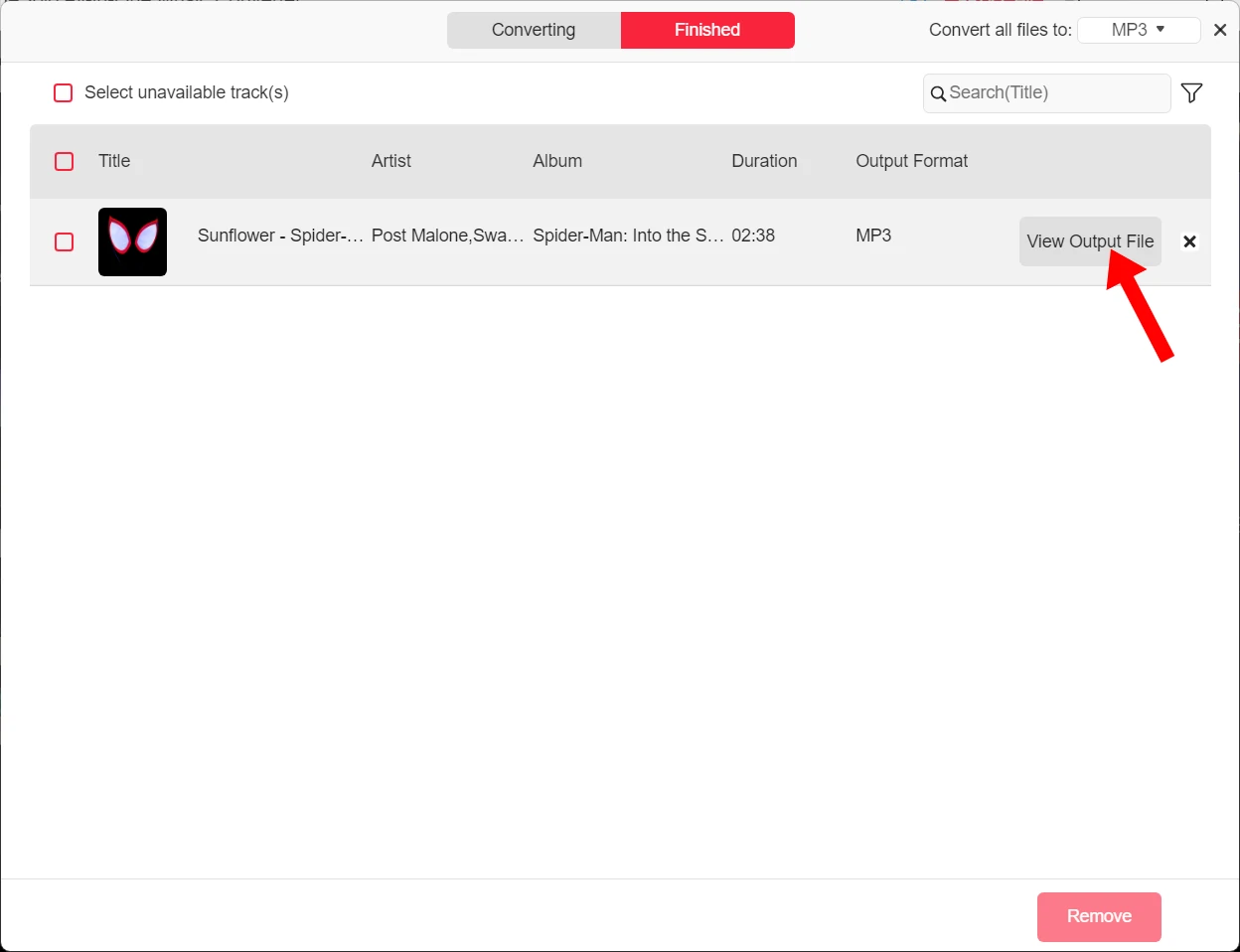
步骤 4.下载完成后,点击“完成”选项卡,然后点击文件图标找到已下载的歌曲。

幻灯片图片

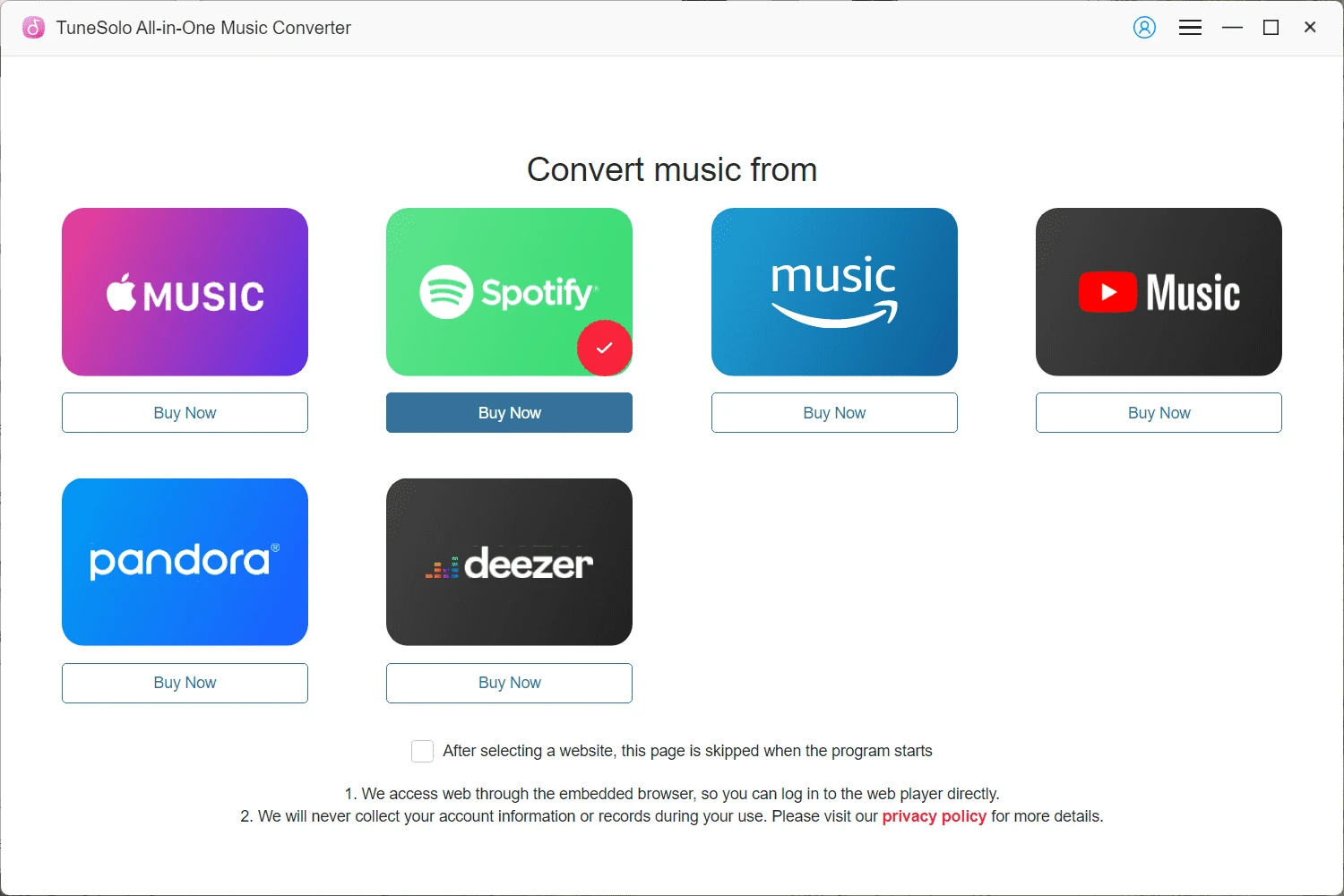
步骤 1.在转换器接口上输入 Spotify Music 服务。

幻灯片图片

步骤 2。 Log in to the web player and directly open a Spotify playlist or song, and drag it to the conversion list on the right side.

幻灯片图片

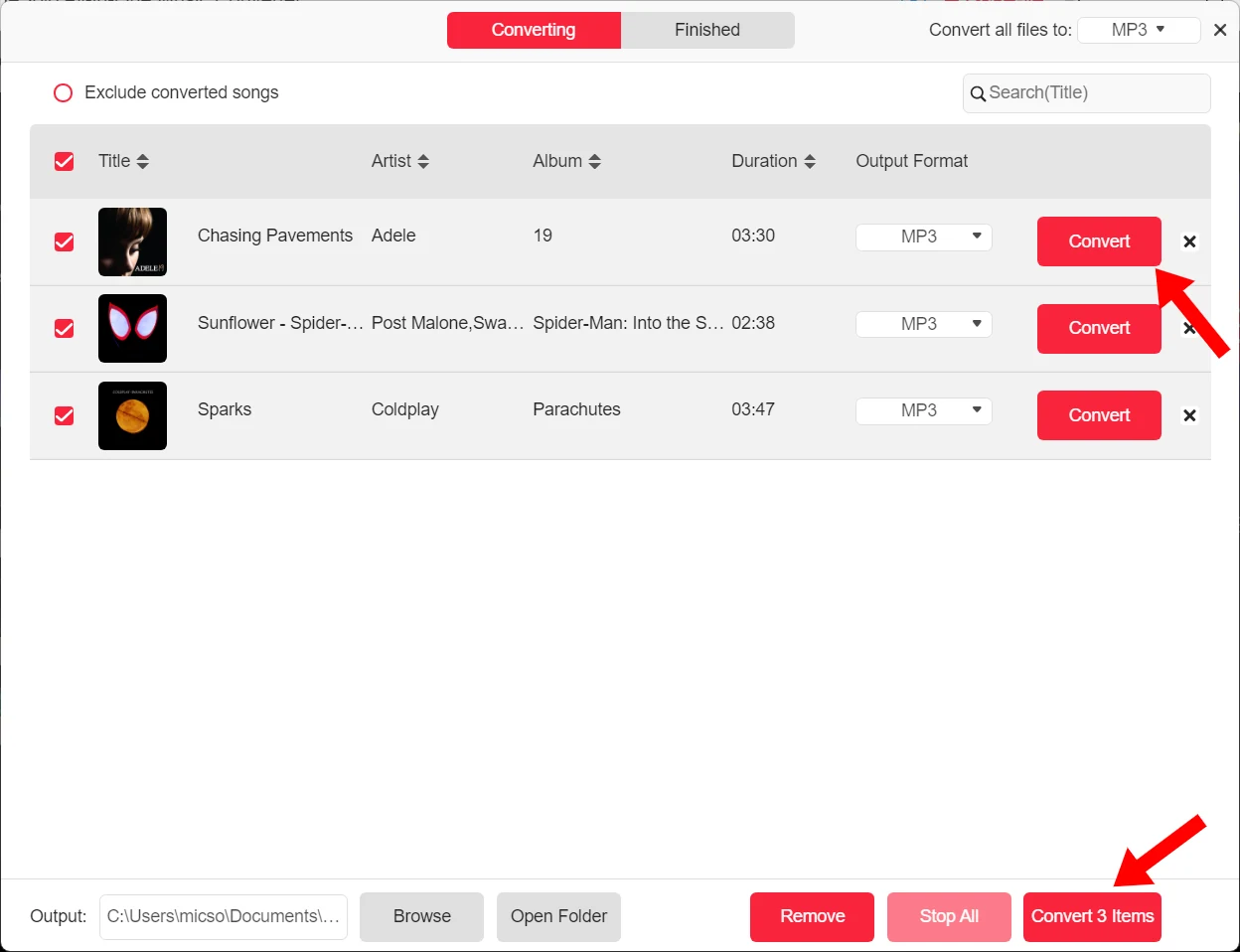
步骤 3.默认输出格式为 MP3。您也可以在转换列表中调整采样率和比特率。现在点击“全部转换”开始下载。

幻灯片图片

步骤 4.下载完成后,点击“完成”选项卡,然后点击文件图标找到已下载的歌曲。

幻灯片图片

步骤 1.在转换器接口上输入 Spotify Music 服务。

免费试用版 VS 完整版

产品特性 免费试堂 完整版
时间限制 为期30天 取决于你的计划
Length for Each Spotify Audio Conversion 每首歌曲的前 3 分钟 无限量
谁可以使用它 Spotify Free and Premium Users Spotify Free and Premium Users
Convert Spotify to MP3, M4A, WAV, FLAC, AIFF, AAC, and ALAC
下载 Spotify 歌曲
Download Spotify Playlists
Download Spotify Albums
Download Spotify Podcasts
Download Spotify Audiobooks
无损音频质量
自定义比特率和采样率
35X更快的转换速度
批量下载
ID3 标签保存
音频文件标题预设
自动输出音频文件存档

我们的用户怎么说

-尼古拉斯·马丁内斯

"Great tool for Spotify Music conversion! I tried the free version before I purchased the software. It works well and no ads pop up. It's easy to use and the download speed is pretty fast. Till now, I've successfully ripped all my Spotify playlists and saved them on my computer."

艾比·雷迪(Abby Reddy)

“下载过程快速流畅。它不是那种充斥着不必要功能的类型。绝对可以与市场上更大的品牌相媲美。”

索菲亚·琼斯(Sophia Jones)

"This Spotify Music Converter developed by TuneSolo is a marvelous tool for converting my Spotify tracks to MP3 format. I need MP3 files so I can save them on my USB and play them offline in my car."

丹韦弗

“使用TuneSolo音乐转换器的整体体验非常棒。所有功能都非常人性化。但是它没有提供编辑转换后曲目的选项。这是我唯一希望改进的地方。”

奥利维亚·哈里斯(Olivia Harris)

"I've tried a lot of Spotify downloaders. So far, TuneSolo is the best. It performs much more stably than online Spotify downloaders, especially with its fast download speed and high success rate. Lossless sound quality can also be preserved after conversion! Cheers to TuneSolo for making downloading Spotify Music easier!"

戴维·普雷斯顿

“我已经订阅这个音乐转换器几天了。目前一切看起来都很好。拖放功能非常有用,因为我用它来下载歌曲的播放列表。转换后的曲目的音质符合我的预期。我给了一个好分数。”

-尼古拉斯·马丁内斯

"Great tool for Spotify Music conversion! I tried the free version before I purchased the software. It works well and no ads pop up. It's easy to use and the download speed is pretty fast. Till now, I've successfully ripped all my Spotify playlists and saved them on my computer."

艾比·雷迪(Abby Reddy)

“下载过程快速流畅。它不是那种充斥着不必要功能的类型。绝对可以与市场上更大的品牌相媲美。”

来自 100 多位行业专家的信任

"TuneSolo Music Converter provides you with flexible options when it comes to setting output audio parameters. You can set the sample rate, bitrate and output format as you preferred. For those who want to keep the original music quality, you can set the sample rate as 44,100 Hz and bitrate as 320 Kbps."

“TuneSolo 音乐转换器也称为播放列表下载器,可一次性下载数十首歌曲,同时还能将它们从 OGG Vorbis 格式转换为 MP3、M4A、WAV 和 FLAC 等离线多媒体格式。”

"The interface of TuneSolo Music Converter is designed to be simple and easy to operate. You just need to simply drag-and-drop the Spotify songs and with few clicks, then you can finish the conversion. "

“这款应用程序的转换速度非常快,而且更加可靠。直观的用户界面让用户使用起来更加方便。这款应用程序适用于 Windows 和 Mac 操作系统。我们的实际体验证明,它对音乐爱好者非常有用。”

“该程序将以 5 倍的速度下载歌曲,而且您也不必担心音频质量会下降。我们喜欢的是,从下载到转换过程,整个过程的质量始终如一。”

"TuneSolo Music Converter provides you with flexible options when it comes to setting output audio parameters. You can set the sample rate, bitrate and output format as you preferred. For those who want to keep the original music quality, you can set the sample rate as 44,100 Hz and bitrate as 320 Kbps."

“TuneSolo 音乐转换器也称为播放列表下载器,可一次性下载数十首歌曲,同时还能将它们从 OGG Vorbis 格式转换为 MP3、M4A、WAV 和 FLAC 等离线多媒体格式。”

"The interface of TuneSolo Music Converter is designed to be simple and easy to operate. You just need to simply drag-and-drop the Spotify songs and with few clicks, then you can finish the conversion. "

“这款应用程序的转换速度非常快,而且更加可靠。直观的用户界面让用户使用起来更加方便。这款应用程序适用于 Windows 和 Mac 操作系统。我们的实际体验证明,它对音乐爱好者非常有用。”

“该程序将以 5 倍的速度下载歌曲,而且您也不必担心音频质量会下降。我们喜欢的是,从下载到转换过程,整个过程的质量始终如一。”

"TuneSolo Music Converter provides you with flexible options when it comes to setting output audio parameters. You can set the sample rate, bitrate and output format as you preferred. For those who want to keep the original music quality, you can set the sample rate as 44,100 Hz and bitrate as 320 Kbps."

“TuneSolo 音乐转换器也称为播放列表下载器,可一次性下载数十首歌曲,同时还能将它们从 OGG Vorbis 格式转换为 MP3、M4A、WAV 和 FLAC 等离线多媒体格式。”

"The interface of TuneSolo Music Converter is designed to be simple and easy to operate. You just need to simply drag-and-drop the Spotify songs and with few clicks, then you can finish the conversion. "

“这款应用程序的转换速度非常快,而且更加可靠。直观的用户界面让用户使用起来更加方便。这款应用程序适用于 Windows 和 Mac 操作系统。我们的实际体验证明,它对音乐爱好者非常有用。”

“该程序将以 5 倍的速度下载歌曲,而且您也不必担心音频质量会下降。我们喜欢的是,从下载到转换过程,整个过程的质量始终如一。”

常見問題解答

01 免费试用版有哪些限制?

使用免费试用版,您只能转换每首歌曲的前 3 分钟。免费试用版可使用 14 天。

02 如何激活 TuneSolo Spotify Music Converter?

启动软件后会弹出一个状态窗口,使用您的电子邮件地址和许可证密钥登录帐户中心,并将其填入相应的框中。登录后点击“更新帐户状态”。

03 我可以将我的许可证转移到另一台计算机吗?

Yes, you can transfer your license to a new computer and it's 100% free. To do that, just install and log in to the software on a new computer, enter the TuneSolo account center, hit "Manage devices" and rest the old computer.

04 TuneSolo 音乐转换器支持哪些转换速度?

它支持最低 35 倍的转换速度,大大加快了转换速度,使其在瞬间完成。

05 如何下载无损音质的 Spotify Music?

To save your Spotify downloads in lossless quality, you can choose the output format as FLAC or M4A(ALAC). FLAC is compatible with most devices and players with a larger file size, and M4A file with ALAC codec is more commonly used on Apple devices or APPs.

If you want to save Spotify Music in MP3, but preserve nearly lossless quality, it is advisable to set the parameters to match the original Spotify bitrate up to 320kbps and the sample rate to 44100Hz.

06 Where are the downloaded Spotify songs saved?

这取决于您使用的是默认设置还是自定义下载位置。无论哪种方式,您都可以通过单击转换窗口底部的文件夹图标轻松找到已下载的歌曲。

07 Can I download Spotify songs to MP3 with Spotify free accounts?

Yes. TuneSolo Spotify Music Converter works for both Spotify free accounts and Premium accounts.

08 TuneSolo Spotify Music Converter 安全吗?

Definitely! This Spotify Music Converter was developed by a professional team in 2016 and has been operational since then. It is a 100% clean and trusted music conversion tool that will not harm your computer or system.

今天就试试 TuneSolo Spotify Music Converter

Freely install TuneSolo Music Converter to batch convert Spotify playlist to MP3 with great sound quality, 35X faster speed, and secure performance to bring free to your Spotify Music journey!


系统要求:
需要7位Windows 64或更高版本。
Mac OS X 10.12或更高版本
评分:
4.8/5
定价:
起售价: $13.95
支持的格式:
MP3、M4A、FLAC、WAV、
AAC、AIFF、ALAC
点击此处查看完整的软件更新历史记录>>

其他人正在使用什么转换器

Apple Music Converter

TuneSolo Apple Music Converter

Remove DRM and convert Apple Music, iTunes M4P songs and Audible AA/AAX audiobooks to MP3 with up to 5X faster speed.

免费试用
免费试用
其他_图片_2

TuneSolo Audible Converter

Download and convert Audible books and convert them from AA/AAX to DRM-free MP3 format

免费试用
免费试用
其他_图片_3

TuneSolo YouTube Music Converter

下载 YouTube Music 或音乐视频到本地 MP3 文件,无质量损失,随时随地享受离线播放。

免费试用
免费试用
关闭

不要再犹豫了

新用户首月订阅可享30%折扣!